Ensure compliance and protect your data! Learn if "are my tags firing before consent" with our comprehensive audit guide.
TL;DR:
- Tags may fire prematurely if consent defaults are not set early, risking legal non-compliance.
- Using the Consent Initialization trigger ensures tags evaluate consent after defaults are established.
- Regular audits and automated monitoring help maintain ongoing compliance and data integrity.
Your cookie consent banner is live, your CMP is configured, and your legal team has signed off. But your analytics tags may still be firing before a single user clicks “Accept.” This is one of the most persistent compliance blind spots in digital marketing, and it affects teams running sophisticated setups just as often as it hits beginners. Race conditions, misconfigured triggers, and default consent states that load a fraction of a second too late can all cause tags to execute before consent is established, creating real exposure to GDPR, CCPA, and ePrivacy violations while simultaneously corrupting your analytics data.
Table of Contents
- Understanding tags, triggers, and consent dynamics
- How to detect if tags fire before consent
- Best practices to prevent premature tag firing
- Special considerations for complex tag and CMP setups
- The uncomfortable truth most experts won’t tell you about tag compliance
- How Trackingplan helps you stay compliant and confident
- Frequently asked questions
Key Takeaways
| Point | Details |
|---|---|
| Audit your tags regularly | Use Tag Assistant or similar tools in a fresh browser session to confirm no tags fire before consent is granted. |
| Order triggers for compliance | Always run consent defaults and updates before any analytics or ad tag triggers in your tag manager setup. |
| Leverage Consent Mode | Prefer Google’s consent-aware tags and Consent Initialization to ensure privacy rules are enforced automatically. |
| Monitor complex deployments | In multi-container or multi-platform environments, extra auditing is needed to prevent premature tag execution. |
Understanding tags, triggers, and consent dynamics
Now that we’ve highlighted why this problem is so common, let’s break down the consent flow mechanics that lead to tags firing too soon.
When we say a tag “fires before consent,” we mean the tag executes its code and potentially sends data to a third party before the user has made a consent decision. In practical terms, this could mean a Google Ads conversion tag pings Google’s servers the moment a page loads, before the consent banner has even rendered on screen. The user hasn’t agreed to anything yet. The data has already left the building.
Tags, triggers, and consent state: the three-way relationship
A tag is a snippet of code that runs in your browser. A trigger tells the tag when to run. Consent state is a signal, usually managed by your Consent Management Platform (CMP), that communicates what the user has or hasn’t agreed to. The problem is that these three components don’t always communicate in the right order.
In Google Tag Manager (GTM), the consent flow works roughly like this: the page begins loading, GTM initializes, your CMP script runs and sets consent defaults, and then tags evaluate whether they’re allowed to fire. But “roughly” is doing a lot of work in that sentence. The actual timing depends on script load order, CMP initialization speed, and how your GTM container is configured. As Google’s own documentation notes, tags can fire prematurely when the consent default or consent update isn’t set early enough, creating a race condition between the CMP and the tag container.
A race condition, in this context, means two processes are competing to finish first, and the outcome depends on which one wins. If your tag container initializes before your CMP sets a consent default, the tag may read a blank or undefined consent state and decide it’s free to fire. This isn’t a bug in the traditional sense. It’s a sequencing failure.
A common root cause of this problem is that some container components read consent state before the default is set, meaning the tag evaluates consent at exactly the wrong moment in the page lifecycle.
Here’s a comparison of how tag behavior differs based on consent timing:
| Scenario | Consent default set? | Tag behavior | Compliance risk |
|---|---|---|---|
| Ideal setup | Yes, before container loads | Tag waits for consent update | Low |
| Race condition | No, or set too late | Tag reads undefined state and fires | High |
| Hard blocking | N/A | Tag blocked entirely until consent | Low, but may limit modeling |
| Consent Mode basic | Yes, with correct defaults | Tag blocked until user interacts | Low |
| Consent Mode advanced | Yes, with correct defaults | Tag fires with cookieless pings | Medium (by design) |
Common symptoms of a race condition in your tag setup include:
- Conversion events recorded in Google Ads or GA4 with no corresponding consent signal
- Duplicate events appearing in your analytics reports
- The consent banner appearing to “flash” briefly before loading
- Console errors referencing undefined consent state
- CMP logs showing consent set after the first dataLayer push
Pro Tip: Don’t assume your CMP alone controls evaluation order. Your CMP may be working perfectly while GTM still reads consent state at the wrong moment. Always test tag behavior in a staging environment with network throttling enabled to simulate slower CMP initialization.
Understanding marketing data governance as a discipline means recognizing that consent timing is not just a technical detail. It’s a data quality issue with legal consequences.
How to detect if tags fire before consent
With a solid grasp of the technical flow, let’s shift to concrete actions: how do you confirm if your site’s tags are actually respecting consent?
The most reliable way to catch premature tag firing is to simulate a brand-new user session and watch exactly what happens. Here’s the professional workflow we recommend:
Step-by-step audit using Google Tag Assistant and browser tools
- Open a fresh incognito window in Chrome. This removes any prior consent cookies that might auto-grant consent before the banner loads.
- Install and activate the Tag Assistant Chrome Extension before navigating to your site.
- Navigate to your homepage or a key conversion page. Do not interact with the consent banner.
- In Tag Assistant, locate the “Consent Initialization” event in the event timeline. This is the earliest point where consent defaults should be set.
- Check whether any tags show a “Fired” status before the Consent Initialization event. Any tag that fires here is a compliance problem.
- Now interact with the consent banner. Accept all, then repeat the session and decline all. Verify that the tag behavior changes appropriately in both cases.
- Cross-reference with your browser’s Network panel. Filter for requests to known ad or analytics domains (google-analytics.com, googletagmanager.com, facebook.net, etc.) and check the timestamp of those requests against when the consent banner appeared.
You can verify consent defaults and updates using Google Tag Assistant’s consent verification steps, which show whether tags are fired or blocked correctly at each stage of the consent flow.
The practical audit methodology recommended by Google involves three confirmation steps: first, confirm the earliest Consent Initialization event sets default consent as Denied; second, confirm your CMP sends an update on user interaction; and third, confirm in Tag Assistant which tags are Fired vs Blocked for both the decline and accept flows.

Here’s what a clean implementation looks like versus a faulty one in Tag Assistant:
| Event in Tag Assistant | Ideal implementation | Faulty implementation |
|---|---|---|
| Consent Initialization | All consent types = Denied | No consent default set |
| Page View | Tags blocked | Tags fired |
| CMP interaction (Accept) | Consent update fires, tags unblock | Tags already fired |
| CMP interaction (Decline) | Tags remain blocked | Tags may still fire |
| Conversion event | Only fires after consent granted | Fires regardless of consent |
Common symptoms to watch for during your audit include:
- Tags listed as “Fired” before any consent interaction in Tag Assistant
- Network requests to ad platforms appearing before the consent banner renders
- No “Consent Initialization” event appearing at all in the Tag Assistant timeline
- Consent state showing as “Not Set” when a tag fires
- CMP update events appearing after conversion tags have already executed
For teams managing preventing tags from firing before consent across multiple properties, this audit process should be documented and repeatable. A one-time check isn’t enough. Every deployment changes the risk profile.
Best practices to prevent premature tag firing
Spotting premature firing is only half the equation. Let’s detail how to robustly prevent it, regardless of your tag manager or consent system.
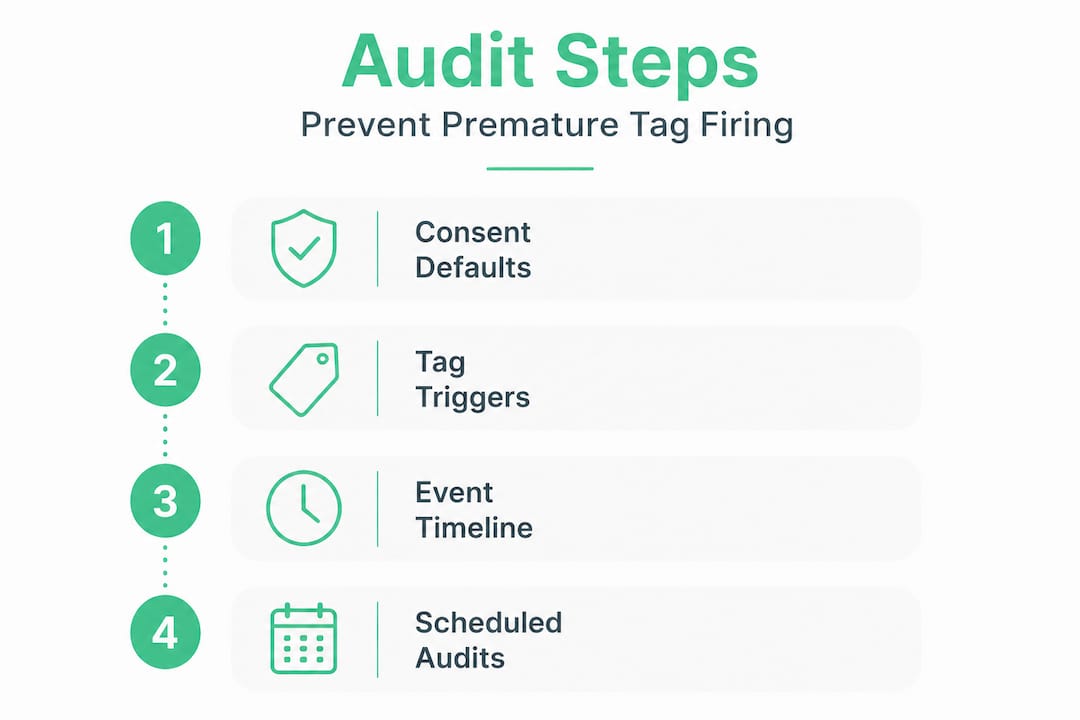
The single most important implementation step is using the Consent Initialization trigger in Google Tag Manager. This trigger fires before any other tags in the container, making it the correct place to run your CMP integration and set consent defaults. If your CMP tag fires on a standard “All Pages” trigger instead of “Consent Initialization,” you are almost certainly creating a race condition.
Here’s the correct order of operations for a compliant GTM setup:
- Step 1: CMP tag fires on Consent Initialization trigger, setting all consent defaults to Denied
- Step 2: GTM container evaluates all other tag triggers against the current consent state
- Step 3: Tags that require consent remain blocked, waiting for a consent update
- Step 4: User interacts with the banner, CMP fires a consent update to the dataLayer
- Step 5: Tags with the appropriate consent type granted now execute
As Google’s guidance confirms, tags are blocked from loading in Consent Mode basic until the user interacts with the consent banner, and only after consent is granted do tags execute and send data. This is the baseline behavior you should be verifying in every audit.
“In Google Tag Manager, ensure consent is established before other tags using the Consent Initialization trigger.” This guidance from Google’s Consent Mode documentation is the foundation of any compliant GTM implementation.
Consent-aware tags vs hard blocking: which is right for your setup?
Hard blocking means a tag simply doesn’t load until consent is granted. Consent-aware tags, by contrast, load but adjust their behavior based on consent state. They might send cookieless pings for modeling purposes without setting any cookies or collecting personal data.
The advantages of consent-aware tags include:
- Better data modeling and conversion recovery through Google’s machine learning
- Reduced impact on analytics accuracy when users decline consent
- Compatibility with Consent Mode advanced, which supports cookieless measurement
- Cleaner implementation that doesn’t require complex custom blocking logic
The advantage of hard blocking is simplicity. If a tag is blocked, it cannot fire prematurely. But hard blocking can reduce your analytics coverage significantly, particularly in markets with high consent decline rates.
Pro Tip: Test all three consent paths on every deployment: full acceptance, full denial, and no interaction at all (user closes the banner or navigates away). Many teams only test the acceptance path and miss critical failures in the denial and no-interaction flows. Automate this with scheduled audits using tools that simulate fresh sessions.
Running Consent Mode audit strategies on a regular schedule, not just at launch, is what separates teams that stay compliant from those that discover violations months after they occurred.
Integrating your CMP correctly with GTM is also critical. Most major Consent Management Tool integrations provide pre-built templates that handle the Consent Initialization trigger automatically. Using these templates reduces the risk of manual configuration errors that cause sequencing failures.
Special considerations for complex tag and CMP setups
Preventing premature tag firing grows more complex as stacks and integrations expand. Here’s what to watch for and practical tips for advanced scenarios.
If your organization runs multiple GTM containers on a single page, the consent sequencing problem multiplies. Each container initializes independently, and there’s no guarantee they share the same consent state at the same time. A tag in Container B might fire before Container A has finished setting consent defaults. This is a real and frequently overlooked risk in enterprise environments.
Multi-container and multi-platform risks
When you have more than one tag container on a page, you need to verify that consent defaults are set correctly in every container, not just the primary one. A secondary container loaded via a third-party script or a partner integration may have no awareness of your CMP at all.
Third-party pixels present a similar challenge. Many marketing platforms provide embed codes that load their own tag managers or tracking scripts independently. These scripts may fire the moment they’re included in your page source, completely bypassing your GTM consent setup. You need to either wrap these in a consent-aware loader or confirm the platform supports Consent Mode natively.
Custom JavaScript variables in GTM are another common source of premature consent reads. If a custom variable reads "window.dataLayer` or a consent API before the CMP has initialized, it may capture an undefined or default-granted state and pass that to a tag trigger incorrectly.
Must-test scenarios for complex setups include:
- Pages with multiple consent banners (e.g., a site-level banner and an embedded third-party widget with its own consent UI)
- Asynchronous script loading where CMP initialization timing varies by connection speed
- Single-page applications where the page doesn’t fully reload between views, affecting when consent state is re-evaluated
- Server-side tagging environments where consent signals must be passed explicitly rather than read from the browser
Migration checklist for introducing Consent Mode or switching CMPs
- Document every tag, trigger, and variable in your current container before making changes
- Identify which tags require consent and which are consent-exempt (e.g., security or fraud detection tags)
- Configure consent defaults in the new CMP or Consent Mode setup to Denied for all applicable types
- Update all CMP-dependent tags to use the Consent Initialization trigger
- Test in a staging environment with network throttling to simulate slow CMP loads
- Run a full Tag Assistant audit on the staging environment before deploying to production
- Monitor your analytics and ad platform data for 48 hours post-deployment to catch any anomalies
- Document the new setup and update your internal compliance records
As Google’s guidance notes, if you already use Consent Mode, prefer letting consent-aware tags adjust behavior based on consent state instead of hard-blocking tags entirely, but ensure consent defaults and updates are ordered correctly. This is especially important during migrations where you might be tempted to hard-block everything as a temporary safety measure.
For teams managing data observability in complex setups, the key is maintaining visibility into what’s happening across all containers simultaneously. You can’t fix what you can’t see.
Microsoft Consent Mode complexities add another layer for teams running Microsoft Advertising alongside Google. The consent signal requirements differ between platforms, and a setup that works correctly for Google may still allow Microsoft tags to fire prematurely if not configured separately.
Pro Tip: Always re-audit after any tag, trigger, or consent manager update, no matter how small. A change to a single trigger condition or a CMP version update can silently break your consent sequencing. Treat every deployment as a new compliance risk.
The uncomfortable truth most experts won’t tell you about tag compliance
Here’s the reality most conference talks and vendor documentation skip over: technical compliance is the easy part. The harder problem is organizational.
Fast launch timelines, campaign deadlines, and the pressure to “just get it live” are the real drivers of consent sequencing failures. We’ve seen it repeatedly. A senior analytics engineer sets up a perfect Consent Mode implementation in staging. Then a campaign manager adds a new pixel two days before launch. A developer tweaks the CMP script load order to fix a performance issue. A third-party agency drops in their own tracking snippet via a tag. None of these individuals intended to break compliance. But each change shifted the sequencing just enough to create a race condition.
The cascade effect is real. A single tag firing before consent can trigger a regulator’s attention, particularly in the EU where data protection authorities actively audit major websites. But even before the legal exposure, the data damage is immediate. Conversion data becomes unreliable. Attribution models skew toward users who declined consent. Marketing spend decisions get made on corrupted signals. The downstream cost of a small sequencing error is far larger than most teams realize.
What actually works is treating consent compliance as an ongoing operational discipline, not a launch checklist item. That means baking audit checkpoints into your standard release process, not just your quarterly analytics sprints. It means requiring a Tag Assistant review before any new tag goes to production. It means having a shared internal document that maps every tag to its consent requirement, updated every time something changes.
The teams that stay consistently compliant aren’t the ones with the most sophisticated CMP setups. They’re the ones with the clearest internal processes. Automated monitoring of ongoing data governance helps, but the cultural shift toward treating every tag change as a compliance event is what makes the difference long-term.
Pro Tip: Bake audit checkpoints into your standard release process. Every new tag, every trigger modification, and every CMP update should trigger an automatic consent audit before it reaches production. This doesn’t require a massive workflow overhaul. A simple checklist item and a 15-minute Tag Assistant review can catch the majority of sequencing failures before they become violations.
How Trackingplan helps you stay compliant and confident
For teams that want peace of mind and seamless compliance, let’s close with a practical solution.
Managing consent compliance manually across multiple tags, containers, and platforms is a significant operational burden. One misconfigured trigger or a CMP update you didn’t notice can undo months of careful setup.
Trackingplan automates the audit process so you don’t have to catch these issues manually. The platform continuously monitors your digital analytics data quality and flags tags that fire outside expected consent boundaries, no code changes required. When something breaks, you get instant alerts via Slack, email, or Teams so your team can act before the data corruption compounds. Trackingplan’s web tracking monitoring gives you a real-time view of your entire tag ecosystem, and the AI-assisted debugging helps you pinpoint root causes fast. Start a free trial and see exactly where your consent implementation stands today.
Frequently asked questions
How can I tell if a tag is firing before consent?
Use Google Tag Assistant to review the consent event timeline and check whether any tags show a “Fired” status before the Consent Initialization event sets the default consent state. Tag Assistant’s consent verification steps show whether tags are fired or blocked correctly at each stage.
What causes tags to fire before user consent is granted?
Tags fire before consent when the consent default or update isn’t set early enough in the page lifecycle, creating a race condition where the tag reads an undefined consent state. As Google’s documentation confirms, this timing failure is the most common root cause of premature tag firing.
Can using Consent Initialization trigger solve this problem?
Yes, the Consent Initialization trigger fires before all other tags in the container, ensuring consent defaults are set first and reducing the risk of tags evaluating consent state too early. Google’s Consent Mode guidance specifically recommends this trigger for establishing consent before other tags execute.
Should I block tags entirely before consent or use consent-aware tags?
Consent-aware tags are generally preferable because they adjust behavior dynamically based on consent state and support data modeling for declined users, but Google’s recommendation is to always confirm the correct order of consent defaults and updates regardless of which approach you use.