A tracking event is the key to modern analytics. Our guide covers schemas, naming, implementation, and automated QA to help you master event tracking.
You launch a campaign, traffic arrives, click data looks healthy, and revenue in the dashboard barely moves. Marketing suspects the landing page. Product suspects checkout. Engineering suspects nothing, because the release passed QA.
Then someone notices the tracking event that used to represent a purchase now has a different name in one app build. Your funnel didn't collapse. Your measurement did.
That's why event tracking matters. Not as a tagging exercise, but as an operational discipline. An effective tracking setup gives analysts, marketers, developers, and QA teams a shared way to describe what users do, across web, apps, and servers. Most importantly, it gives you a way to trust what your dashboards claim.
Why Your Analytics Might Be Lying to You
A broken dashboard rarely announces itself. The charts still load. Sessions still appear. Paid traffic still shows up. What disappears is confidence.
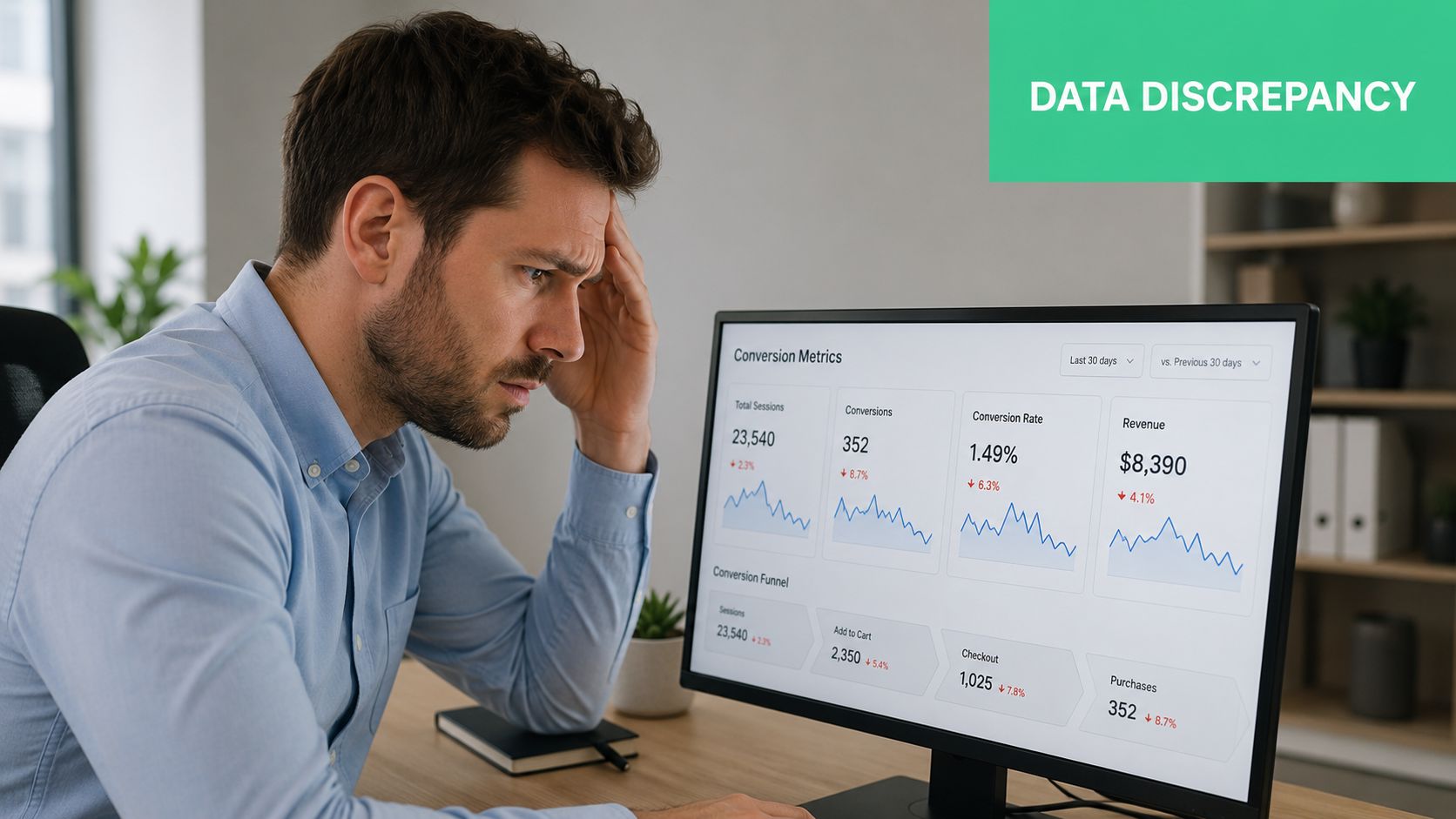
Teams often don't lose trust in analytics because the tool fails. They lose trust because implementation drifts over time. A button label changes, a developer removes a property, a mobile release ships with a renamed event, or a server-side process stops forwarding a critical signal. The result is the same. Reports look precise while the underlying data is no longer comparable.
Where the mismatch starts
Traditional reporting focused heavily on pageviews and sessions. Modern measurement depends on discrete user actions captured at the event level, such as clicks, form submissions, downloads, and purchases. According to Amplitude's event tracking guide, event tracking captures specific interactions with a name, timestamp, identifier, and contextual properties. That structure is what makes funnel analysis and drop-off analysis possible.
If you're seeing suspicious conversion gaps, it helps to review common failure patterns. A practical checklist is this guide on signs your analytics is broken and how to fix it.
Broken analytics usually looks like a business problem first. Teams debate performance when the real issue is instrumentation.
Why browser-only setups often miss the full story
A lot of teams still rely too heavily on client-side tags. That works for many interactions, but it's fragile for events tied to back-end truth, such as subscription renewals, refunds, account provisioning, or offline reconciliation. Server-side collection gives you a cleaner way to track events that shouldn't depend on the browser firing correctly. This overview of Cometly on server-side tracking benefits is useful if you're weighing that trade-off.
What usually works:
- Clear ownership: Someone owns event definitions, not just dashboard consumers.
- Cross-team review: Marketing, product, analytics, and engineering agree on the meaning of core events.
- Continuous validation: Teams check for regressions after releases, campaign launches, and tag changes.
What doesn't work:
- One-time implementation: Tags added during a launch and ignored afterward.
- Ad hoc naming: Similar actions tracked under different names across platforms.
- Manual spot checks: Looking in a dashboard after the fact and hoping nothing changed.
The Anatomy of a Modern Tracking Event
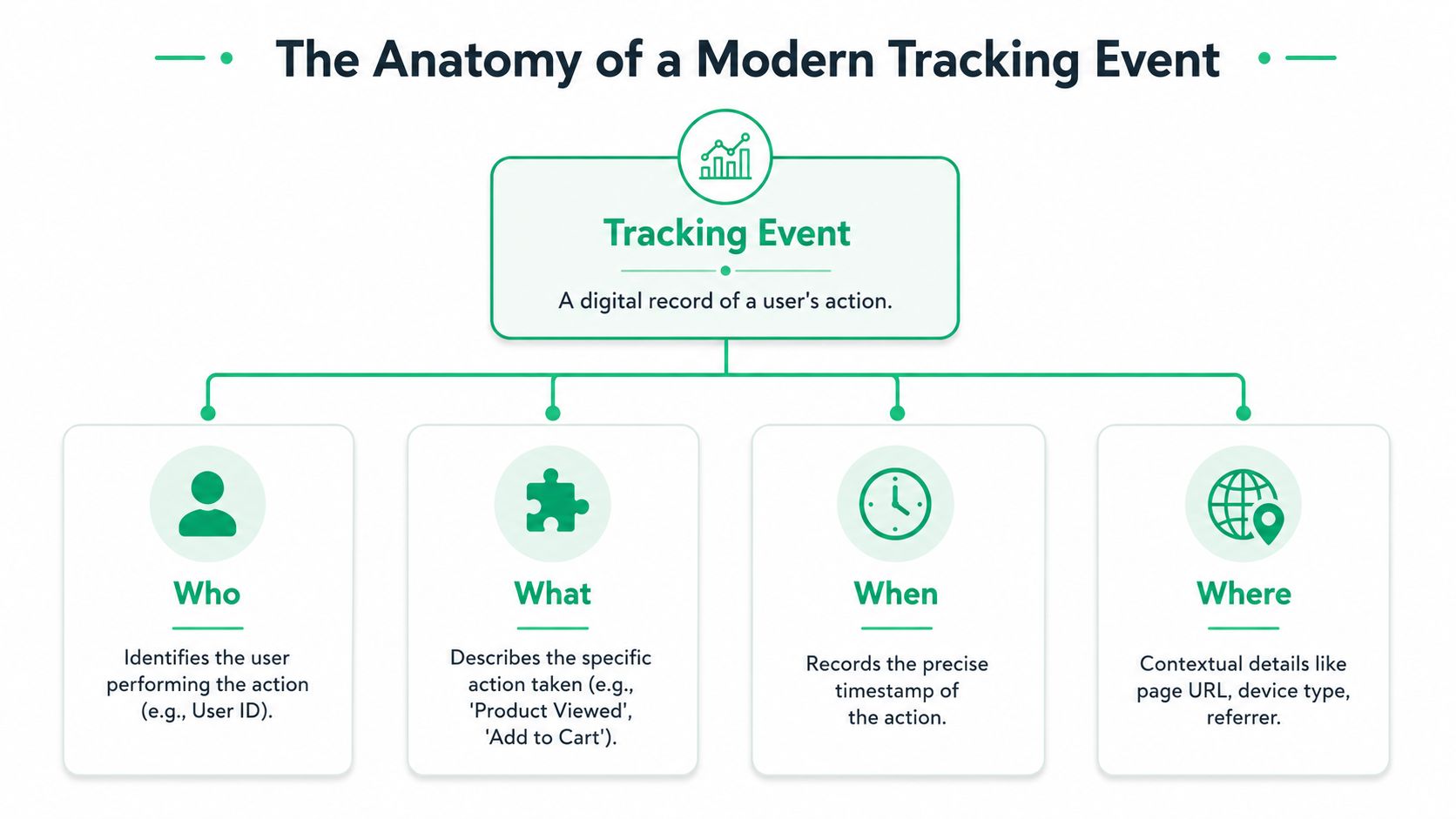
A tracking event is a record of something that happened at a specific moment. Imagine it as a shipped package. It needs a recipient, a description, a timestamp, and enough context for the receiver to understand what arrived.
The four fields that matter most
At a minimum, a useful event has four parts:
- Who: a user identifier, anonymous ID, account ID, or device-linked identifier
- What: the action itself, such as
product_viewedorcheckout_started - When: the timestamp
- Where: contextual details like page URL, screen name, device type, referrer, or campaign metadata
That isn't just a best practice. Amplitude describes event tracking as a core measurement practice built around discrete, timestamped user actions, where each event typically carries a name, timestamp, identifier, and contextual properties.
Properties turn an action into analysis
The event name tells you what happened. Properties tell you what kind of event it was.
A product_viewed event becomes much more useful when it includes fields like:
product_id: identifies the itemcategory: supports merchandising or content groupingprice: gives commercial contextcurrency: prevents reporting ambiguitypage_type: distinguishes PDP views from embedded widgetsexperiment_variant: ties behavior to test exposure
Without properties, you can count actions. With properties, you can segment them.
Practical rule: If a property changes how you would interpret the event in a report, define it up front in the tracking plan.
Why event-level detail beats pageview-only measurement
Pageviews answer location-based questions. Events answer behavioral questions.
If a user lands on a pricing page, pageview data tells you they were there. Event data tells you whether they clicked the annual plan toggle, opened FAQs, started checkout, and abandoned before payment. That's why event-based setups now sit at the center of product and marketing analytics.
For teams building a clean implementation, this walkthrough on the data layer for analytics tracking is worth revisiting before developers start shipping tags.
A simple event payload might look like this:
| Field | Example | Why it matters |
|---|---|---|
| Event name | product_viewed | Defines the action |
| Timestamp | 2026-01-10T14:23:11Z | Preserves sequence and timing |
| User ID | user_12345 | Connects actions across sessions |
| Event ID | evt_abc123 | Helps deduplicate |
| Properties | product_id, category, price | Adds reporting context |
Designing Your Event Schema and Naming System
A team ships purchase on the website, order_completed in the backend, and checkout_success in the app. Three months later, finance asks for a single conversion number and no one trusts the answer. That problem usually starts in schema design, not in reporting.
A usable schema gives every team the same definition of an event, the conditions for firing it, and the fields that must travel with it. Treat it as a shared contract between product, engineering, marketing, and analytics. Without that contract, names drift, properties mutate, and every new release creates more cleanup work.
What your schema should define
Event names are only one part of the spec. The schema also needs enough detail to stop ambiguity before code ships.
Include:
- The event name: one canonical label used everywhere
- The trigger condition: the exact user or system action that fires the event
- Required properties: fields that must always be present
- Optional properties: fields allowed in specific cases
- Expected types: string, number, boolean, array, enum
- Allowed values where needed: for fields like
currency,plan_type, orcheckout_step - Ownership: the team or person who approves changes
- Platform coverage: web, iOS, Android, server, or all of them
The extra discipline pays off later. If signup_completed requires method, plan_type, and user_id, validation can catch missing or malformed payloads before they corrupt a dashboard. It also gives engineers clear implementation rules instead of loose tickets and Slack clarifications.
Naming conventions that scale
The naming system should survive redesigns, channel changes, and team growth. In practice, two patterns show up often.
| Scenario | Object-Action Convention | C.A.T. (Category-Action-Tag) Convention | Recommendation |
|---|---|---|---|
| Product interaction | product_viewed | ecommerce-click-product | Prefer Object-Action for readability |
| Checkout milestone | checkout_started | checkout-start-step1 | Prefer Object-Action for cleaner funnel logic |
| Content engagement | video_played | media-play-homepagehero | Use Object-Action, keep context in properties |
| Campaign click | cta_clicked | campaign-click-spring-sale | Use Object-Action, move campaign detail to properties |
| Multi-team governance | Easier to standardize | Often grows inconsistently | Choose Object-Action unless you have a legacy dependency |
I usually recommend Object-Action in snake_case, such as product_viewed, cart_updated, purchase_completed.
The trade-off is real. C.A.T. can feel descriptive at first because the event name carries more context. It also creates a maintenance problem. Teams start encoding page name, module, experiment, and campaign into the event itself, so one business action turns into five near-duplicates. Funnel reporting gets harder, QA gets slower, and schema drift becomes normal.
Keep the event name stable. Put changing context in properties.
If two events differ only by page, campaign, placement, or experiment, they usually represent one event with different properties.
Design for change without letting the schema drift
A schema needs room to evolve, but not in ways that break reporting. That means adding fields carefully, limiting free-text properties, and using enums when the allowed values are known.
For example, checkout_started can support new payment methods over time. The event name should stay the same. The property payment_method can expand from card and paypal to include apple_pay later. By contrast, changing price from a number to a string or sending currency as both USD and $ creates cleanup work in every downstream tool.
Teams usually get burned when a developer adds a property with a slightly different name, a mobile release sends the wrong type, or a backend service starts emitting nulls after an API change. If the schema is vague, those issues reach production undetected. If the schema is explicit, automated checks can catch them quickly.
What to avoid from the start
Naming breaks down fast when teams treat event labels as temporary.
Common mistakes include:
- Synonyms across tools:
purchase,order_completed, andtransactionall representing the same action - UI-driven names:
green_button_clicked, which becomes meaningless after a redesign - Versioned events:
signup_v2_completed, which turns temporary implementation detail into permanent reporting debt - Mixed tense and format:
Product View,Added to Cart,Checkout Start
One more rule helps: avoid putting campaign metadata into event names. Keep attribution detail in UTMs and event properties, then govern those values with the same discipline. A clear campaign naming convention for marketing analytics prevents the acquisition side from becoming a second source of naming chaos.
Good schema design is less about creating a neat spreadsheet and more about preventing silent failures. Clear names, explicit property rules, and assigned ownership make event data easier to implement, easier to validate, and much harder to corrupt.
Implementing Events Across Your Tech Stack
A tracking event shouldn't mean one thing on the website, another in iOS, and something else on the server. The payload can vary by platform. The business meaning can't.
The simplest way to implement cross-platform tracking is to define one canonical event and map each platform to it. Let's use product_viewed.
Web implementation with Google Tag Manager
On the web, a common pattern is pushing structured data into the dataLayer and letting Google Tag Manager route it.
<script>window.dataLayer = window.dataLayer || [];window.dataLayer.push({event: 'product_viewed',user_id: 'user_12345',product_id: 'sku_987',product_name: 'Trail Running Shoes',category: 'Footwear',price: 129.99,currency: 'USD',page_type: 'product_detail'});</script>A GTM trigger listens for the custom event product_viewed. Your GA4, Adobe Analytics, or other vendor tags then map fields consistently from the data layer.
This pattern works well because it separates application logic from vendor-specific tag logic. Developers push one structured event. Tag managers and downstream tools consume it.
Mobile implementation in Swift and Kotlin
For mobile apps, the same event name should carry equivalent meaning.
Swift
let properties: [String: Any] = ["user_id": "user_12345","product_id": "sku_987","product_name": "Trail Running Shoes","category": "Footwear","price": 129.99,"currency": "USD","screen_name": "ProductDetail"]// Replace analyticsSDK.track with your SDK methodanalyticsSDK.track("product_viewed", properties: properties)Kotlin
val properties = mapOf("user_id" to "user_12345","product_id" to "sku_987","product_name" to "Trail Running Shoes","category" to "Footwear","price" to 129.99,"currency" to "USD","screen_name" to "ProductDetail")// Replace analyticsSdk.track with your SDK methodanalyticsSdk.track("product_viewed", properties)Server-side implementation in Node.js
Some events don't belong in the browser or app at all. A subscription renewal, invoice payment, shipment confirmation, or account upgrade often happens on the back end.
const payload = {event: "subscription_renewed",timestamp: new Date().toISOString(),user_id: "user_12345",subscription_id: "sub_456",plan_name: "pro_monthly",billing_status: "paid",currency: "USD"};// Replace endpoint and auth with your analytics collectorfetch("https://analytics.example.com/collect", {method: "POST",headers: {"Content-Type": "application/json"},body: JSON.stringify(payload)}).then(res => res.json()).then(data => console.log(data)).catch(err => console.error(err));Keep implementation boring
That sounds negative, but it's the right goal. Stable tracking comes from repetition and consistency.
Use the same checklist everywhere:
- Match the canonical name: don't improvise by platform.
- Reuse property names:
product_idshould beproduct_ideverywhere. - Set timestamps explicitly: don't rely on defaults if timing matters.
- Document trigger conditions: record exactly when the event fires.
- Test the payload itself: not just whether the request was sent.
The mistakes that hurt most aren't flashy. They're small inconsistencies repeated across systems.
Automating Event Validation and Quality Assurance
Friday afternoon release. Monday morning dashboard. Revenue looks down 18%, paid traffic appears unstable, and the product team starts questioning the checkout flow. By noon, the cause turns out to be a renamed property in one event payload. The event still fired. The reports just stopped interpreting it correctly.
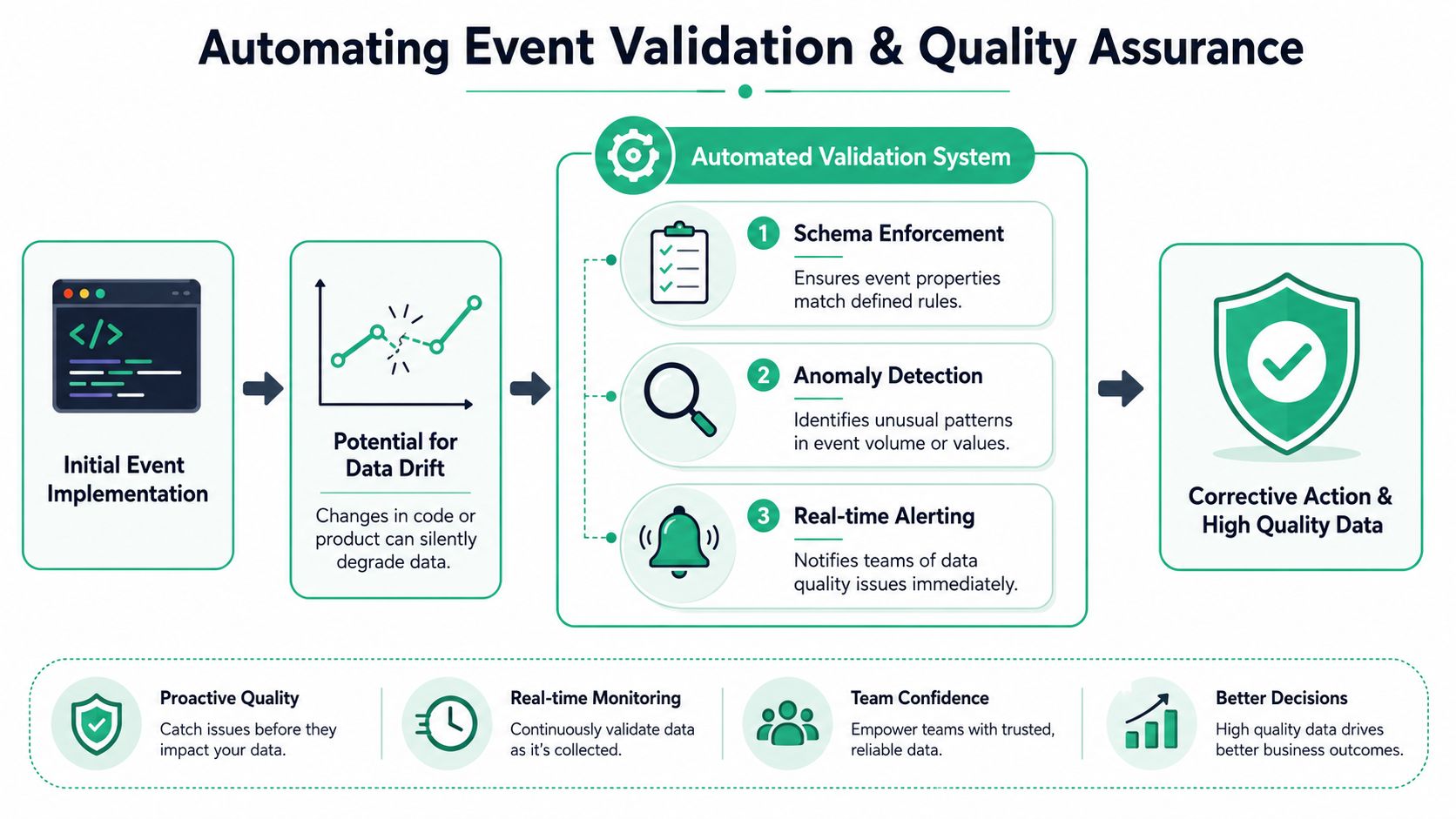
That pattern is common because analytics QA often assumes tracking is finished once instrumentation ships. In practice, tracking is a living system. Front-end components change, mobile releases lag behind web, campaign parameters get added by marketing, and server-side integrations evolve with billing, CRM, and warehouse work. A setup that looked correct during launch testing can drift out of spec a week later.
Schema drift is a common, insidious problem. A property changes from price to item_price. A number starts arriving as a string. An object becomes an array after an SDK update. Nothing looks broken in the network tab, but attribution logic, funnel steps, and downstream models start failing unnoticed.
Why manual QA fails in practice
Manual QA still matters. It is useful for release testing, critical-path checks, and validating tricky edge cases before code goes live.
It is a weak primary defense.
A person can confirm that purchase_completed fires on a staging checkout. That same person cannot continuously verify every event name, property type, consent flag, destination mapping, and volume pattern across web, app, and server-side streams. The problem is not discipline. It is scale, timing, and coverage.
Teams run into this quickly when they try to compare event volumes by hand after a release or campaign change. The process is possible, but slow and easy to misread, which is why this Trackingplan video on manually verifying event volumes is useful mainly as a demonstration of the workflow and its limits.
By the time someone notices a discrepancy in a dashboard, bad data has often already reached multiple destinations.
What automated validation should monitor
A useful QA layer checks more than event presence. It evaluates whether each event still matches the contract your downstream systems expect.
In practice, that means continuously monitoring:
- Schema conformance: does the payload match expected fields, types, formats, and required values?
- Unexpected events: are undocumented or rogue events appearing in production?
- Volume shifts: did a key event drop, spike, or flatten compared with its normal range?
- Destination delivery: did the same event reach analytics, ads, CDPs, and warehouse pipelines as intended?
- Consent and privacy rules: are restricted properties being sent where they should not go?
Teams stop treating QA as a launch checklist and start treating it as production monitoring. The tracking plan becomes an enforceable contract, not a document that goes stale in a wiki.
Why schema drift causes so much damage
Missing events are easier to catch because they disappear. Drift is harder because the event still exists, so dashboards continue to populate and create false confidence.
I have seen this in routine releases. A developer cleans up naming for readability. A mobile team shortens a property to save space. A server-side mapping drops a nested field after a vendor update. Each change looks minor in isolation. Together, they break joins, attribution rules, and audience logic without throwing a visible error.
Automated QA should report three things fast. What changed. Where it changed. Which rule or contract it violated.
That level of detail matters because fixing the issue is usually a cross-functional job. Analytics can identify the broken contract, engineering can trace the release or transform that introduced it, and marketing or product can judge the reporting impact. Without shared alerts and ownership, teams waste hours arguing over whether the problem is in the dashboard, tag manager, app release, or warehouse model.
What a practical monitoring workflow looks like
A monitoring setup that holds up in production usually has four layers:
A versioned tracking plan
Define required properties, accepted types, naming rules, owners, and destination expectations in one maintained source of truth.Automated inspection of live traffic
Observe real payloads from the data layer, SDK calls, network requests, server-side collectors, and downstream destinations.Alerts with context
Notify the right team when a key event disappears, drifts, or changes volume, and include the exact field, environment, page, release, or destination involved.A clear triage path
Route issues back to the team that can fix them fastest, whether that is web engineering, mobile, data engineering, or marketing operations.
For teams building that workflow around server-side collection, automating event validation in server-side tagging is worth reviewing because it reflects the reality of modern stacks. Browser events are only part of the picture now.
Trackingplan itself is one option in this category. Its role is factual and straightforward. It discovers implementations across web, app, and server-side environments, monitors for anomalies and schema mismatches, and alerts teams when instrumentation changes.
Spreadsheets and launch-day screenshots cannot keep up with that job. Continuous validation can.
Connecting Tracking Events to Business Outcomes
A tracking event matters because it becomes part of a sequence. One action rarely explains a business result. A chain of actions usually does.
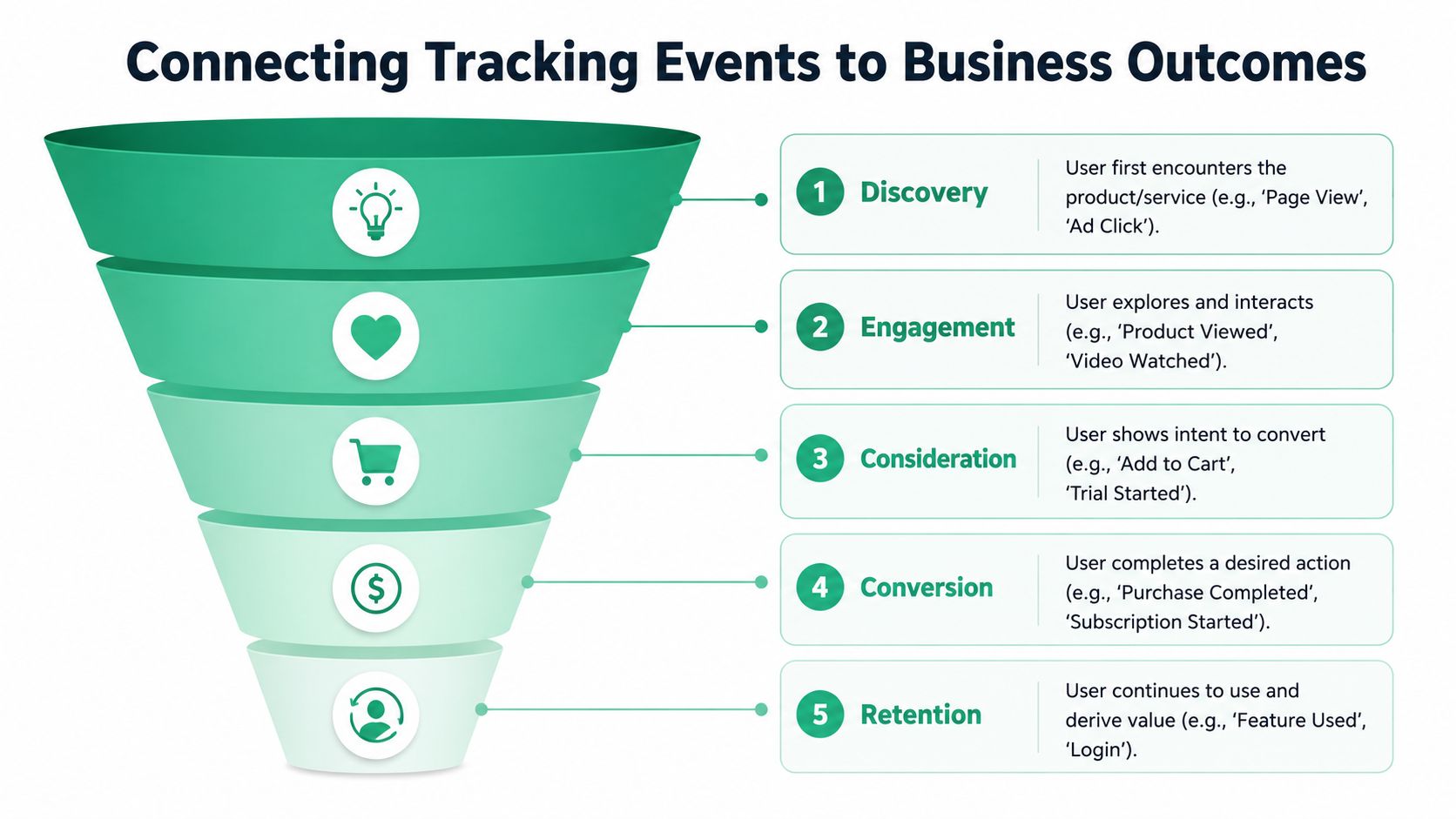
The move from page-load analytics to event-based frameworks happened because teams needed to follow user journeys across interactive websites, mobile apps, and servers. Industry guidance now treats standardized, real-time event tracking as a foundational data-quality layer for attribution, funnel analysis, and product decisions, as outlined in Infotrust's explanation of event-based analytics.
Turn events into a journey
A simple commerce sequence might look like this:
- Discovery:
ad_clicked - Landing:
page_viewed - Engagement:
product_viewed - Intent:
add_to_cart - Conversion:
purchase_completed - Retention:
subscription_renewedorfeature_used
One event tells you an action happened. The sequence tells you where users stall, accelerate, or disappear.
Use properties to answer business questions
The event name gives the skeleton. Properties add the business lens.
For example:
| Business question | Events involved | Useful properties |
|---|---|---|
| Which channels produce qualified traffic? | landing_page_viewed, signup_completed | source, medium, campaign_name |
| Which products create the strongest purchase intent? | product_viewed, add_to_cart | product_id, category, price |
| Which onboarding steps correlate with activation? | signup_completed, onboarding_step_completed, feature_used | plan_type, step_name, workspace_size |
The point of event tracking isn't to collect more rows. It's to preserve enough behavioral detail that teams can connect user actions to outcomes they care about.
When this is done well, marketing attribution gets cleaner, product funnels become explainable, and experimentation stops depending on guesswork.
From Data Chaos to Trusted Insights
Reliable analytics doesn't come from tagging more things. It comes from defining them clearly, implementing them consistently, and validating them continuously. That's the shift that separates dashboards people tolerate from dashboards people use to make decisions.
Teams that want richer analysis on top of trustworthy event data can also explore adjacent methods like discovering AI customer insights, but that layer only works when the behavioral data underneath it is sound. Trust starts with instrumentation. Then governance. Then automation.
If your team is tired of manual audits, broken funnels, and unclear ownership, Trackingplan is worth evaluating as a way to monitor analytics implementations across web, apps, and server-side systems, keep tracking plans current, and catch data quality issues before they distort reporting.
.avif)