
What is a tracking audit and why does it matter for marketing?
A tracking audit is the process of verifying that every measurement mechanism in your digital marketing setup fires correctly, sends accurate data, and aligns with your reporting requirements. The industry term you will also encounter is analytics audit or tag audit, but tracking audit has become the standard shorthand for the full scope of work: tags, pixels, events, consent signals, and data reconciliation.

The consequences of skipping this work are concrete and expensive. Broken pixels mean Facebook and Google receive no conversion signals, so their algorithms optimize for clicks instead of revenue. Duplicate events inflate your reported return on ad spend, making a mediocre campaign look profitable. Missing data layer variables cause GA4 to log incomplete events, corrupting your funnel analysis. Every one of these failures is invisible without a deliberate audit process.
Consider what happens when a developer pushes a site update that accidentally removes the Google Ads conversion tag from the checkout confirmation page. Your Google Ads account keeps reporting conversions because the tag fires on the order summary page instead, but those are page views, not purchases. Your cost per acquisition looks artificially low. You scale budget into a campaign that is actually underperforming. A tracking audit catches this within days rather than months.
The purpose of tracking audits extends beyond fixing broken things. Accurate marketing insights depend on a verified tracking foundation. Without that foundation, every A/B test, attribution report, and budget decision rests on unreliable data.
Here is what a thorough tracking audit examines:
- Tag firing accuracy: Does each tag fire on the correct pages and trigger conditions, with no misfires on excluded pages?
- Event data quality: Do event parameters like product IDs, revenue values, and user properties pass correctly to GA4, Meta, and other platforms?
- Consent compliance: Does your consent management platform correctly block or allow tags based on user consent choices?
- Deduplication logic: Are server-side and client-side events deduplicated to prevent double-counting conversions?
- Data layer integrity: Are all required variables populated before tags fire, or are some events sending null values?
- Cross-platform reconciliation: Do conversion counts in GA4, Google Ads, and Meta Events Manager align within an acceptable variance?
Pro Tip: Run a quick sanity check before any full audit by comparing your GA4 session count against your ad platform click data for the same period. A gap of more than 15% is a reliable signal that something is broken and worth investigating immediately.
Audits on average uncover 6 to 8 issues, with 2 to 3 of those directly affecting conversion tracking. That means the average marketing team is making budget decisions with corrupted conversion data right now.
How to conduct a tracking audit: key steps and best practices
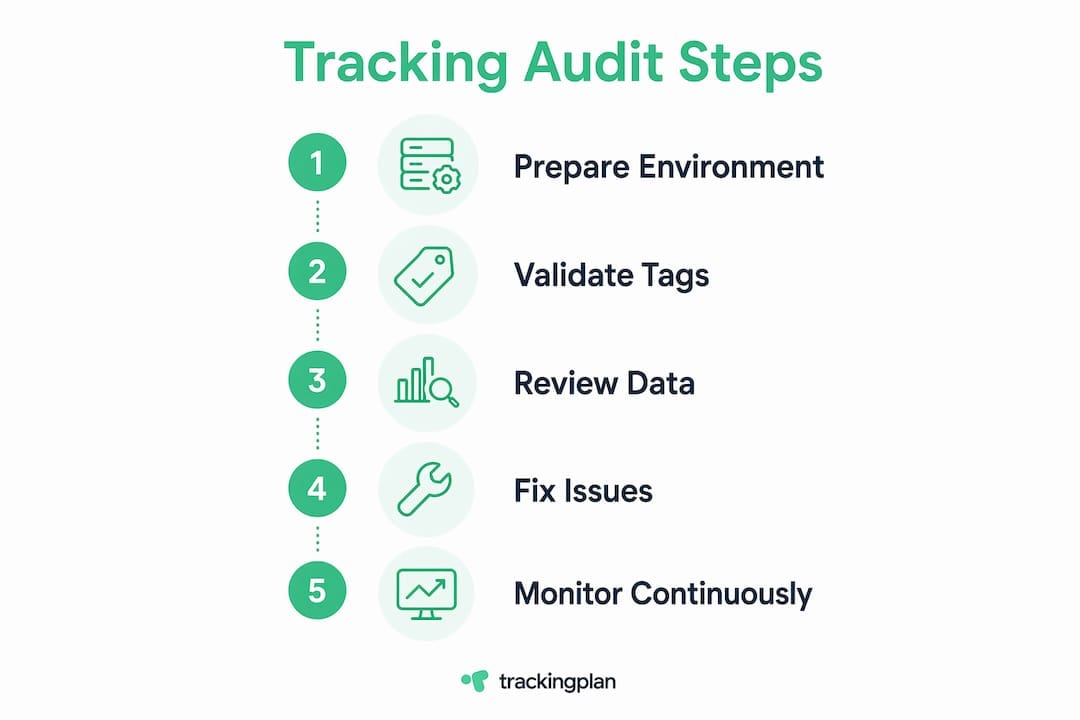
A repeatable tracking audit process follows a defined sequence. Improvising the order wastes time and creates gaps. The framework below reflects the 30-point quarterly audit that most analytics professionals treat as the baseline standard, taking 3 to 5 hours for a mid-size site.
- Define scope and inventory your tags. Export a full tag list from Google Tag Manager or your tag management system. Document every tag, its trigger, and its intended purpose. If you cannot explain why a tag exists, flag it for review.
- Validate tag firing with GTM Preview mode. Walk through every key user journey: homepage, product page, add to cart, checkout, confirmation. Confirm each tag fires exactly once on the correct step. Note any tags firing on wrong pages or failing to fire at all.
- Verify event data in GA4 DebugView. Activate DebugView and repeat your user journeys. Check that event parameters like "purchase
,item_id, andvalue` carry the correct data. A purchase event with a null revenue value is worse than no event at all because it corrupts your average order value metric. - Audit Meta pixel events in Meta Events Manager. Use the Test Events tool to confirm that standard events like Purchase, AddToCart, and Lead fire with the correct parameters. Check for duplicate events, which Meta flags directly in the interface.
- Review consent management platform behavior. Disable consent for analytics and advertising, then repeat your journeys. Confirm that blocked tags do not fire. This step is non-negotiable for GDPR and CCPA compliance.
- Reconcile data across platforms. Pull 30-day conversion data from GA4, Google Ads, and Meta. Build a simple reconciliation table and investigate any variance above 10%.
- Document every issue found. Clear documentation of tracking issues with status and progress drives accountability and ensures problems get resolved rather than forgotten.
- Classify issues by severity and assign owners. Use the severity framework described in the next section. Assign each issue to a named owner with a deadline.
Pro Tip: Create a staging environment that mirrors your production site and run your audit there first. You can test fixes without risking live data corruption, and you will catch issues introduced by new deployments before they reach real users.
The table below summarizes the tools you need and what each one covers.
These tools together validate event firing, data accuracy, and consent management compliance across your full stack. No single tool covers everything, which is why the combination matters.
Manual vs. automated tracking audits: benefits and limitations
Manual audits and automated monitoring solve different problems. Treating them as interchangeable is the most common mistake analytics teams make.
A manual audit is a deliberate, scheduled review conducted by a human analyst walking through defined user journeys and checking data against expected outcomes. Its strength is depth. A skilled analyst notices when a revenue parameter is technically present but populated with the wrong currency format, or when a tag fires correctly on desktop but silently fails on mobile Safari due to a cookie restriction. Its weakness is frequency. You cannot manually audit a 500-page e-commerce site every day.
Automated monitoring tools continuously watch your tracking implementation for sudden breaks. They detect when a tag stops firing entirely, when event volume drops by 40% overnight, or when a new deployment removes a critical pixel. Automated monitoring catches immediate failures that manual audits would miss between quarterly review cycles. The limitation is that automation struggles with slow-degrading issues: a parameter that gradually sends incorrect values, or a consent configuration that works for most users but fails for a specific browser segment.
The practical answer is to use both. Run automated monitoring continuously to catch acute failures, and run manual audits quarterly to find the chronic, subtle issues that automation overlooks.
Here is how to decide which approach fits each situation:
- Use automated monitoring when you need continuous coverage, when your team manages multiple client sites, or when you cannot afford even a few days of broken tracking before detection.
- Use manual audits when you are launching a new site, migrating to a new tag management system, implementing server-side tracking, or investigating a specific data discrepancy that automated alerts flagged.
- Use both together for any production environment where conversion data drives budget decisions above $10,000 per month in ad spend.
Analytics accuracy drives measurably better ROI, which makes the investment in both monitoring approaches straightforward to justify to finance teams.
Common tracking audit issues and how to prioritize fixes
Most tracking audits surface the same categories of problems. Knowing what to expect helps you move faster and prioritize the fixes that matter most.
Duplicate conversion events are the most financially damaging issue. They occur when a purchase event fires twice: once from a client-side tag and once from a server-side event without deduplication logic. The result is inflated ROAS that misleads every budget decision downstream. Google Ads and Meta both provide deduplication mechanisms using event IDs, but they require explicit implementation.
Broken tags after site deployments are the most common issue by volume. A developer updates the checkout flow, the data layer variable name changes from order_id to orderId, and every downstream tag that references the old variable name silently fails. This is why audits after major changes are as important as scheduled quarterly reviews.
Consent conflicts create compliance risk and data gaps simultaneously. A misconfigured consent management platform either blocks tags that users consented to, creating data loss, or fires tags that users rejected, creating legal exposure. Both outcomes are serious.
Schema mismatches between your documented tracking plan and your actual implementation cause silent data quality failures. An event named purchase in your schema might fire as Purchase in production, which GA4 treats as a different event entirely.
The severity framework for prioritizing fixes works as follows:
- Critical (fix same day): Complete data loss on conversion events, consent violations, tags firing on all pages when they should not.
- High (fix within one week): Duplicate conversion events, broken revenue parameters, missing events on key funnel steps.
- Medium (fix within two weeks): Incorrect parameter values, minor event naming inconsistencies, missing secondary events.
- Low (fix in next sprint): Best practice improvements, redundant tags, documentation gaps.
Pro Tip: Always fix conversion events and core data layer issues before addressing secondary events. A perfectly instrumented scroll-depth event is worthless if your purchase event is double-counting revenue.
Detecting tracking issues early prevents small misconfigurations from compounding into months of corrupted data. The cost of a quarterly audit is trivial compared to the cost of optimizing campaigns against false signals for a full quarter.
Key takeaways
A tracking audit is the single most effective way to confirm that your marketing data reflects reality rather than a broken implementation.
Why I think most teams are auditing too late
I have reviewed tracking setups for marketing teams across e-commerce, SaaS, and lead generation, and the pattern is almost always the same. The audit happens after someone notices the numbers look wrong. A campaign manager sees ROAS drop 30% in a week and assumes the market shifted. A CFO questions why reported conversions are double what the CRM shows. Only then does anyone open GTM Preview mode.
The uncomfortable reality is that most tracking implementations degrade continuously. Every site update, every new A/B testing tool, every consent banner update is an opportunity for something to break. Teams that audit reactively are always working with a data set that has been corrupted for weeks or months before they noticed.
What I have found actually works is treating the tracking audit as a release gate, not a fire drill. Before any major deployment goes live, someone on the team runs through the core conversion journeys in a staging environment. It takes 45 minutes. It catches the data layer variable rename that would have broken purchase tracking for three weeks.
The governance piece matters just as much as the technical process. Audit-ready analytics transform data quality from a best-effort practice to a designed system, with schema contracts, named owners, and versioned documentation. Teams that build this structure catch issues before they reach production. Teams that skip it spend their time explaining to leadership why the numbers do not add up.
My advice: schedule your next tracking audit for this quarter, assign a named owner, and document every issue you find with a resolution deadline. Do that consistently for two quarters and you will have a tracking setup you can actually trust. – David Pombar, Swiss Army Knive at Trackingplan.
How Trackingplan makes tracking audits faster and more reliable
Trackingplan automates the monitoring and audit readiness work that consumes the most time in a manual process. The platform continuously validates your tracking implementation across web, app, and server-side environments, detecting broken pixels, schema mismatches, and missing events in real time. When something breaks, Trackingplan sends alerts via Slack, email, or Microsoft Teams so your team knows within minutes rather than weeks.
For marketing teams managing digital analytics data quality across GA4, Meta, Google Ads, and other platforms, Trackingplan provides a single dashboard that surfaces issues, tracks resolution progress, and documents your implementation history. It does not replace quarterly manual audits, but it eliminates the gaps between them. Explore web tracking monitoring to see how continuous validation fits into your audit workflow.
FAQ
What is a tracking audit in digital marketing?
A tracking audit is a structured review of all tags, pixels, events, and data layers in a marketing analytics setup to verify that data collection is accurate and complete. It covers tag firing, event parameters, consent compliance, and cross-platform data reconciliation.
How often should you run a tracking audit?
Quarterly full audits are the standard recommendation, supplemented by targeted audits after major site changes, new campaign launches, or platform migrations. High-traffic sites with significant ad spend benefit from continuous automated monitoring between scheduled reviews.
What is the difference between a tracking audit and a performance audit?
A tracking audit verifies the accuracy of your data collection mechanisms, confirming that the right data reaches the right platforms. A performance audit evaluates how well your campaigns, pages, or channels are performing using that data. You need a clean tracking audit before a performance audit means anything.
What tools are used in a tracking audit?
The standard toolkit includes GTM Preview mode for tag firing validation, GA4 DebugView for event parameter verification, Meta Events Manager for pixel event testing, and browser developer tools for inspecting raw network requests. Campaign monitoring best practices also recommend staging environments for pre-production testing.
What are the most common issues found in a tracking audit?
The most frequent issues are duplicate conversion events, broken tags after site updates, consent management misconfigurations, and schema mismatches between documented and actual event names. Of these, duplicate conversions carry the highest financial impact because they inflate ROAS and corrupt budget allocation decisions.