
A dashboard goes sideways faster than expected. Revenue looks down, conversion rate falls off a cliff, paid campaign performance stops making sense, and within minutes analysts, marketers, engineers, and product managers are all staring at different tools trying to prove the problem is somewhere else.
The first response is usually tactical. Check the tag manager. Compare yesterday to today. Open the browser console. Ask whether a release went out. Patch the broken event, republish, and move on. That works if the issue is isolated. It fails when the same class of problem keeps returning under a different name.
That's where root cause analysis matters. It turns a scramble into a repeatable way of asking what failed, what allowed it to fail, and what change will stop the same incident from resurfacing next week. For analytics teams, that difference is huge. A quick fix restores a chart. A real RCA protects reporting, attribution, experimentation, and trust in the whole stack.
I've seen teams confuse resolution with learning. They solve the visible breakage, but they never address the release practice, naming convention, ownership gap, or validation blind spot that caused it. The result is predictable. More incidents. More noisy Slack threads. Less confidence in the data.
That same mindset shows up in security and governance work too, which is why analysts who want stronger systems thinking often borrow from disciplines outside analytics. If your work increasingly overlaps with risk, controls, and incident handling, structured resources that help you prepare for CISSP certification can sharpen the way you think about failures across the stack.
Introduction From Fire-Drill to Lasting Fix
A typical analytics fire-drill starts with a symptom, not a cause. Someone notices that purchases are down in Google Analytics, an executive asks whether checkout is broken, paid media managers worry about attribution, and the team starts testing pages by hand. The pressure pushes everyone toward speed, which usually means treating the first obvious issue as the answer.
That's why teams end up fixing leaves instead of roots. A missing event gets re-added. A broken property gets renamed. A destination gets reconnected. Then the same pattern returns after the next frontend release, consent banner update, or app version rollout.
What changes when you use RCA
Root cause analysis replaces guesswork with a bounded investigation. You define the incident clearly, gather evidence in order, separate contributing factors from the actual cause, and choose a corrective action that prevents recurrence instead of masking it.
For analytics QA, that changes the conversation:
- From “Who touched this?” to “What changed in the system?”
- From “Can we patch the event?” to “Why did the pipeline allow invalid data through?”
- From “Is the dashboard fixed?” to “How will we know this won't happen again?”
The real cost of bad analytics incidents isn't only the broken metric. It's the loss of trust that follows every time teams have to ask whether the numbers are safe to use.
Why temporary fixes keep failing
Manual troubleshooting tends to stop at the first workable explanation. In practice, that's often the nearest technical detail: a missing dataLayer field, an altered CSS selector, a deleted tag, a changed API payload. Those matter, but they're often only the direct trigger.
The lasting fix usually sits deeper. Maybe there was no release validation for tracking-critical components. Maybe campaign naming rules existed in a slide deck but not in enforcement. Maybe ownership was split across agency, product, and engineering, so no one reviewed tracking changes end to end.
RCA slows the team down just enough to stop repeating the same operational mistake.
Unpacking Root Cause Analysis Fundamentals
Think of analytics incidents like weeds. If you cut the leaves, the yard looks better for a few days. If you remove the root, the weed stops coming back. What is root cause analysis if you strip away the jargon? It's the discipline of finding that root instead of tidying the surface.
A practical RCA starts with a concrete problem statement. Not “tracking is broken,” but “purchase events lost a required property after the last release,” or “campaign attribution is inconsistent across paid social links.” The tighter the statement, the cleaner the investigation.
Symptoms, triggers, and the underlying cause
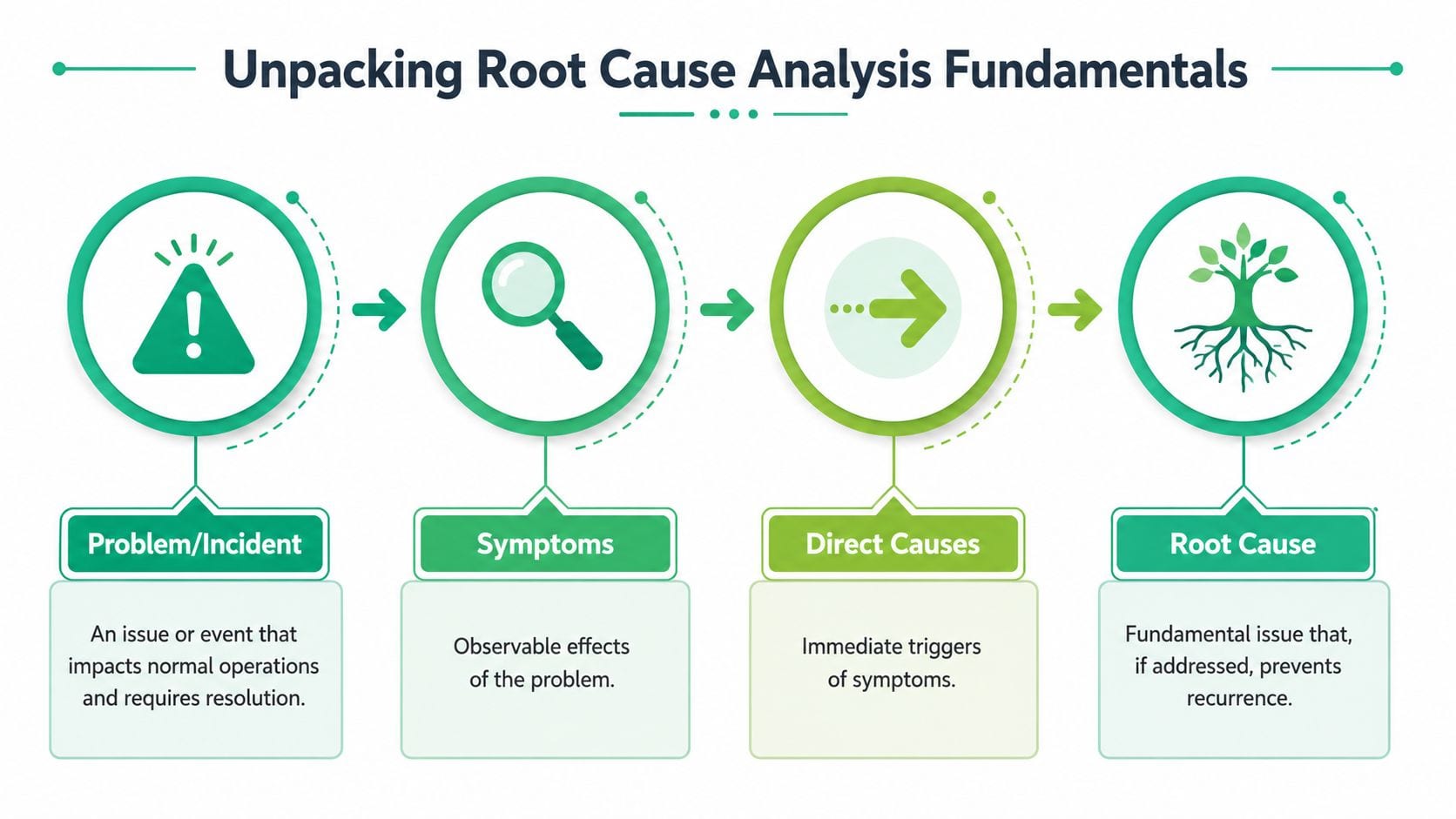
One reason RCA gets misunderstood is that teams mix up three different layers:
- Symptoms are the visible effects. A dashboard drops. A conversion disappears. A channel suddenly shows “direct.”
- Direct causes are the immediate triggers. A property wasn't sent. A rule in Google Tag Manager didn't fire. A redirect stripped query parameters.
- Root causes are the deeper conditions that made the incident possible. No schema validation. Weak release review. No owner for UTM governance.
That distinction is central to the method. According to the AHRQ primer on root cause analysis in healthcare and safety systems, RCA was initially developed to analyze industrial accidents and is now widely used in health care, where a key shift was distinguishing active errors from latent errors. In plain language, that means separating the immediate mistake from the system condition that allowed the mistake to matter.
Why blame ruins the analysis
When a team asks, “Who broke tracking?” the investigation usually gets worse. People become defensive, evidence gets filtered, and the team settles for the first human action they can point to. That's not RCA. That's fault assignment.
A better question is, “What combination of process, tooling, and implementation let this happen?” That's how analysts start thinking like reliability teams.
If you work in a modern stack with web, app, server-side forwarding, consent rules, and multiple destinations, this systems view overlaps directly with data observability in analytics operations. The point isn't to find one dramatic answer. It's to understand the chain of conditions that produced the failure.
Practical rule: If your RCA ends with a person's name, you probably stopped too early.
Key Root Cause Analysis Methodologies
There isn't one RCA method that fits every analytics incident. That's one of the first things teams need to unlearn. Some problems are narrow and linear. Others are messy, cross-functional, and full of partial evidence. The method should match the shape of the problem.
The 5 Whys
The 5 Whys is the lightest-weight technique. You start with the incident and ask why repeatedly until the team reaches a cause it can act on. Common practice says roughly 5 “why” questions can uncover a root cause, though in practice the number can be as low as 2 or as high as 50 according to Tableau's overview of iterative root cause analysis techniques.
That range matters. It tells you the method isn't a ritual. It's a disciplined search for causal depth.
A simple analytics example:
- Why did conversions drop?
- Because the purchase event stopped sending.
- Why did it stop sending?
- Because the frontend event listener no longer matched the checkout confirmation element.
- Why did that happen?
- Because the checkout UI was refactored without updating tracking logic.
- Why wasn't that caught?
- Because the release process didn't include analytics validation for conversion-critical flows.
The value is speed. The risk is oversimplification. If several causes interact, 5 Whys can force a neat story onto a messy event.
Fishbone diagrams
A fishbone diagram works better when the issue spans teams or categories. Instead of drilling down one chain, you map possible causes across buckets such as People, Process, Tools, Data, and Environment.
For analytics QA, that's useful when a problem has social and operational dimensions, not just technical ones. Inconsistent attribution, duplicate events, or unreliable naming conventions usually fall into this category.
Use a fishbone when you need to widen the frame before narrowing it.
Fault tree analysis
Fault tree analysis is more formal. You start with the failure at the top and work downward through the combinations of events that could produce it. This is strong for complex digital systems where several failures must align before the visible incident appears.
For example, “purchase tracking failed” may require a frontend change, a consent-state edge case, and a server-side mapping mismatch. Fault tree analysis helps the team model that interaction instead of pretending there was only one path to failure.
Comparison of RCA Methodologies
| Methodology | Best For | Complexity |
|---|---|---|
| 5 Whys | Narrow incidents with a likely linear chain of causation | Low |
| Fishbone Diagram | Cross-functional issues with many possible cause categories | Medium |
| Fault Tree Analysis | Complex failures with interacting technical conditions | High |
Choosing the right tool
A lot of bad RCA comes from picking the easiest method, not the right one.
- Use 5 Whys when the incident is focused and recent, and the evidence trail is clear.
- Use a fishbone when marketing, analytics, product, and engineering all contributed something to the problem.
- Use fault trees when distributed systems, multiple data handoffs, or layered conditions are involved.
If your team needs a practical diagnostic flow before choosing the framework, this guide to troubleshooting analytics errors step by step is a useful bridge between incident handling and full RCA.
RCA in Action for Analytics and Tracking
Theory gets clearer when you apply it to incidents teams face. In analytics, the best investigations usually mix technical evidence with process evidence. The question isn't only what failed in the browser or app. It's also what in the team's operating model let that failure reach production.

Example one, a broken conversion event
Start with a familiar problem. Purchase volume in the dashboard falls sharply after a frontend deployment. Revenue in the payment processor looks normal, so the business process is intact. The measurement is what broke.
A 5 Whys path might look like this:
- Why did tracked conversions drop? The purchase event stopped reaching the analytics destination.
- Why did the event stop reaching it? The event fired without a required field and was rejected downstream.
- Why was the field missing? The
dataLayerpush changed after a checkout component refactor. - Why wasn't the change detected before release? No analytics validation was part of the deployment checklist.
- Why didn't anyone own that validation? Tracking changes were treated as implementation details, not production data dependencies.
The direct cause is the missing field. The root cause is the missing control in the release process.
Example two, inconsistent campaign attribution
Now take a messier issue. Paid social traffic shows inconsistent source and medium values across reports. Some links use one naming style, others use another, and some lose tagging on redirect. That's not a clean 5 Whys problem. It's a fishbone problem.
Map possible causes by category:
- People. Marketers and agencies use different tagging habits. New team members haven't been trained on conventions.
- Process. There's no enforced UTM standard, no review step, and no owner for campaign governance.
- Tools. Link builders, ad platforms, and redirect tools don't preserve parameters consistently.
- Data. Downstream transformations normalize some campaign values but not others.
That's the point where experienced analysts become more valuable. Teams hiring for this kind of work often want people who can connect implementation details to reporting outcomes, which is why looking at current top business intelligence jobs can be a useful way to see how the market frames that skill set.
ASQ notes in its guidance on root cause analysis methods and systems thinking that RCA is a collective term for multiple approaches, and the strongest analyses treat the issue as a system problem to be solved with evidence rather than a hunt for one person to blame. That's exactly how analytics RCA should work.
For teams dealing with broken events, missing parameters, and unstable schemas, this practical guide to fixing digital analytics issues through root-cause investigation is close to how many analysts already work in the field.
The best analytics RCA outputs are boring in a good way. They identify the failure, document the evidence, assign a fix, and change the process so the same incident becomes harder to repeat.
Common RCA Failure Modes and How to Avoid Them
Most RCA failures don't come from using the wrong template. They come from team habits. The analysis gets rushed, politicized, or stretched so wide that nobody can finish it.
Stopping at the first plausible answer
This is the most common mistake in analytics teams. Someone finds a broken selector, a missing event property, or an API mismatch and declares victory. That may explain the symptom, but it doesn't explain why the issue escaped testing, monitoring, or review.
A quick test helps. Ask whether your proposed cause can be turned into a preventive control. If the answer is no, you're probably still looking at a trigger, not a root cause.
Running an investigation with no boundaries
The opposite mistake is going too broad. A team starts with “purchase attribution looks wrong” and ends up debating platform strategy, org design, martech procurement, and every release from the last quarter. That isn't rigor. It's drift.
Keep the problem statement narrow enough that evidence can confirm or reject it. You can always log adjacent risks separately.
Turning RCA into a blame ritual
Once an RCA becomes a search for a culprit, people stop sharing context. Engineers defend code changes. Analysts defend implementation requests. Marketers defend campaign setup. The investigation gets shallower because nobody wants to expose uncertainty.
Use language that points to conditions, not personalities.
- Instead of “the developer forgot the field”
- Use “the release workflow didn't validate required event properties”
That phrasing isn't soft. It's more precise.
Collecting opinions instead of evidence
Strong RCA depends on ordered evidence. Weak RCA depends on memory and confidence. In analytics, memory is especially dangerous because several teams touch the same pipeline and each one sees only a slice of it.
If the timeline is fuzzy, the conclusion will be fuzzy too.
Pull from logs, deployment notes, destination behavior, tag changes, payload samples, and report timing. When evidence conflicts, document that conflict instead of forcing a clean story.
The Shift to Automated RCA in Analytics QA
Manual RCA still matters, but digital analytics environments have outgrown purely manual investigation. Web releases happen constantly. App versions overlap. Consent states vary by region. Multiple destinations receive the same event in slightly different forms. By the time a person notices a dashboard anomaly, the bad data may already be spread across reporting, attribution, and activation workflows.
Why manual workflows break down
In data-rich systems, incidents often have multiple interacting causes, which is why Datadog's guidance on RCA in modern digital environments emphasizes structured evidence-gathering from logs, metrics, and timelines and notes the shift toward causal trees and automated monitoring loops over one-off postmortems.
That description fits analytics QA almost perfectly. A broken event rarely stays local. It affects downstream tools, dashboards, and decisions. Manual RCA can still find the answer, but it often does so after the team has already spent hours collecting screenshots, exports, payloads, and release context.
What automation changes in practice
Automated observability shortens the path from symptom to explanation. Instead of waiting for an analyst to discover that a property disappeared, the system detects the anomaly, compares it with the expected schema or historical behavior, and surfaces the likely source of change.
That's the practical evolution of RCA in analytics. Not replacing judgment, but front-loading the evidence collection that usually eats most of the time.
One example is incident response automation for analytics operations, where teams connect detection, alerting, ownership, and follow-up so the investigation starts with context instead of guesswork.
A product in this space is Trackingplan, which monitors analytics and martech implementations, detects issues such as missing events, schema mismatches, campaign tagging errors, broken pixels, and consent-related problems, and helps teams trace errors back to implementation changes or specific warnings in the data flow. That's useful because analytics incidents rarely fail in just one place.
A short product walkthrough makes the shift more concrete:
Where human judgment still matters
Automation can tell you what changed, where it changed, and what data is affected. People still need to decide what counts as the actual root cause and what systemic action will prevent recurrence.
That usually means answering a harder question than “what broke?” It means deciding whether the fix belongs in code review, release policy, ownership design, tracking-plan governance, or validation rules. Automated RCA gets you to that decision faster. It doesn't remove the need to make it well.
Implementing an RCA Culture in Your Data Team
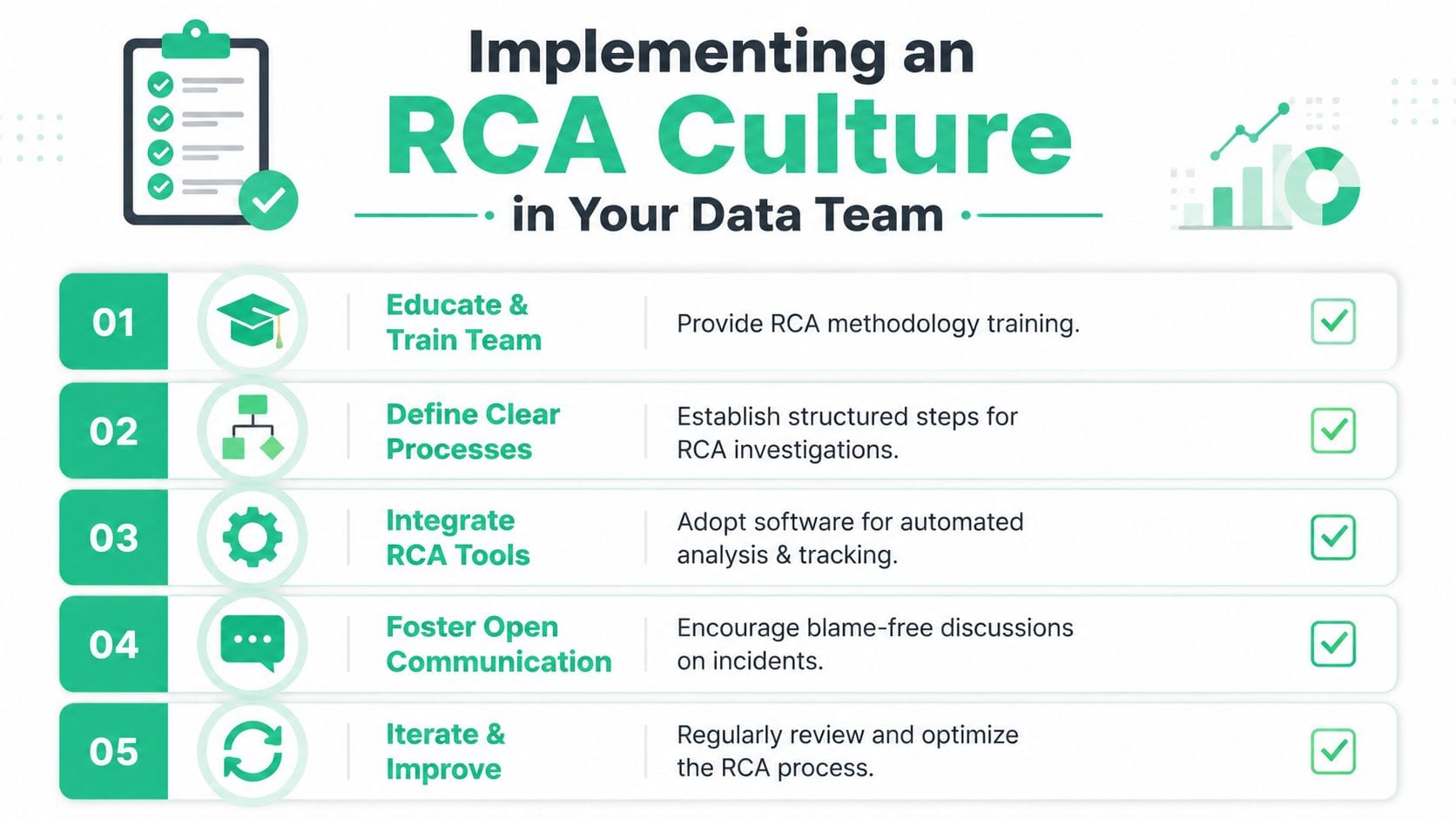
RCA only works when it becomes a habit, not an occasional workshop exercise. Teams don't need a heavy program to start. They need a lightweight operating rhythm they will sustain.
Start with ownership and a simple template
Assign one role to drive each investigation. Not to own the incident personally, but to make sure evidence is gathered, the timeline is written down, and follow-up actions don't disappear.
Use a small template with these fields:
- Incident statement. What failed, where, and how it showed up.
- Evidence trail. Logs, payloads, timeline notes, screenshots, and release context.
- Contributing factors. Conditions that made the issue more likely or harder to detect.
- Root cause. The deepest cause the team can act on.
- Preventive action. The change that should reduce recurrence.
Prioritize the incidents that matter most
Not every broken tag deserves a full investigation. A good practice is to convert recurring issues into frequency-and-impact data, then focus on the failures that happen often or carry the most business impact. Seeq describes this as a Pareto-style approach in its explanation of how to prioritize problems during root cause analysis.
That keeps the team from boiling the ocean.
Build the follow-through loop
The investigation is only half the work. The value comes from validating that the corrective action changed the failure pattern.
Use a short cadence:
- Run RCA on a meaningful incident.
- Assign one preventive change.
- Verify the change after implementation.
- Add the lesson to team standards.
- Review recurring failure modes every cycle.
Working rule: If the RCA ends in a document instead of a process change, the team learned less than it thinks.
If your team wants a more reliable way to detect analytics issues, trace them back to implementation changes, and keep dashboards trustworthy without constant manual audits, Trackingplan is worth evaluating as part of your analytics QA workflow.