
A familiar pattern plays out in analytics teams every week. The campaign is approved, tags are queued, the product team wants attribution live by Friday, and then someone asks a simple question: are we sending personal data anywhere we shouldn't?
Suddenly the launch slows down. Legal wants the vendor list. Engineering wants exact event payloads. Marketing says the pixel has been on three other sites already. Nobody can fully explain what the new setup collects, where the data goes, or whether consent logic covers every destination.
That scramble is what I'd call privacy panic. It usually isn't caused by bad intent. It's caused by treating privacy as a late-stage review instead of an operational design practice.
Moving Beyond Privacy Panic
The teams that handle privacy well don't improvise at launch time. They use a privacy impact assessment to make the implementation legible before data starts flowing.
A good PIA isn't a legal memo that disappears into a folder. It's a working decision document. It tells the analytics owner what data is collected, the engineer where it moves, the marketer which tools receive it, and the compliance team which risks need mitigation before release.
That shift became much more than a best practice on May 25, 2018, when the GDPR made Data Protection Impact Assessments mandatory for high-risk processing, affecting over 50 million organizations worldwide and setting a global standard, as reflected in GDPR Article 35.
What privacy panic usually looks like
In digital analytics, the warning signs are easy to recognize:
- A new vendor appears late: A team adds a session replay tool, ad pixel, or server-side destination after the original review.
- Consent logic is assumed, not verified: People believe the CMP blocks collection, but nobody checks each downstream event.
- Data mapping stops at the tag manager: The implementation shows what fires in the browser, not what arrives in Google Analytics, Meta, Snowflake, or a webhook.
- No one owns risk decisions: Legal asks for controls, but product and marketing own the actual deployment details.
Privacy problems rarely start with policy language. They start with undocumented data movement.
What changes when a PIA is done properly
A real privacy impact assessment gives teams a repeatable way to answer the questions that stall launches:
- What personal data exists in this flow?
- Why are we collecting it?
- Which systems receive it?
- What could go wrong?
- What controls must exist before release?
That's the practical promise of a PIA for analytics teams. It replaces vague reassurance with a documented model of the implementation. Once that model exists, privacy stops being a last-minute blocker and starts working like quality assurance for data use.
What Is a Privacy Impact Assessment
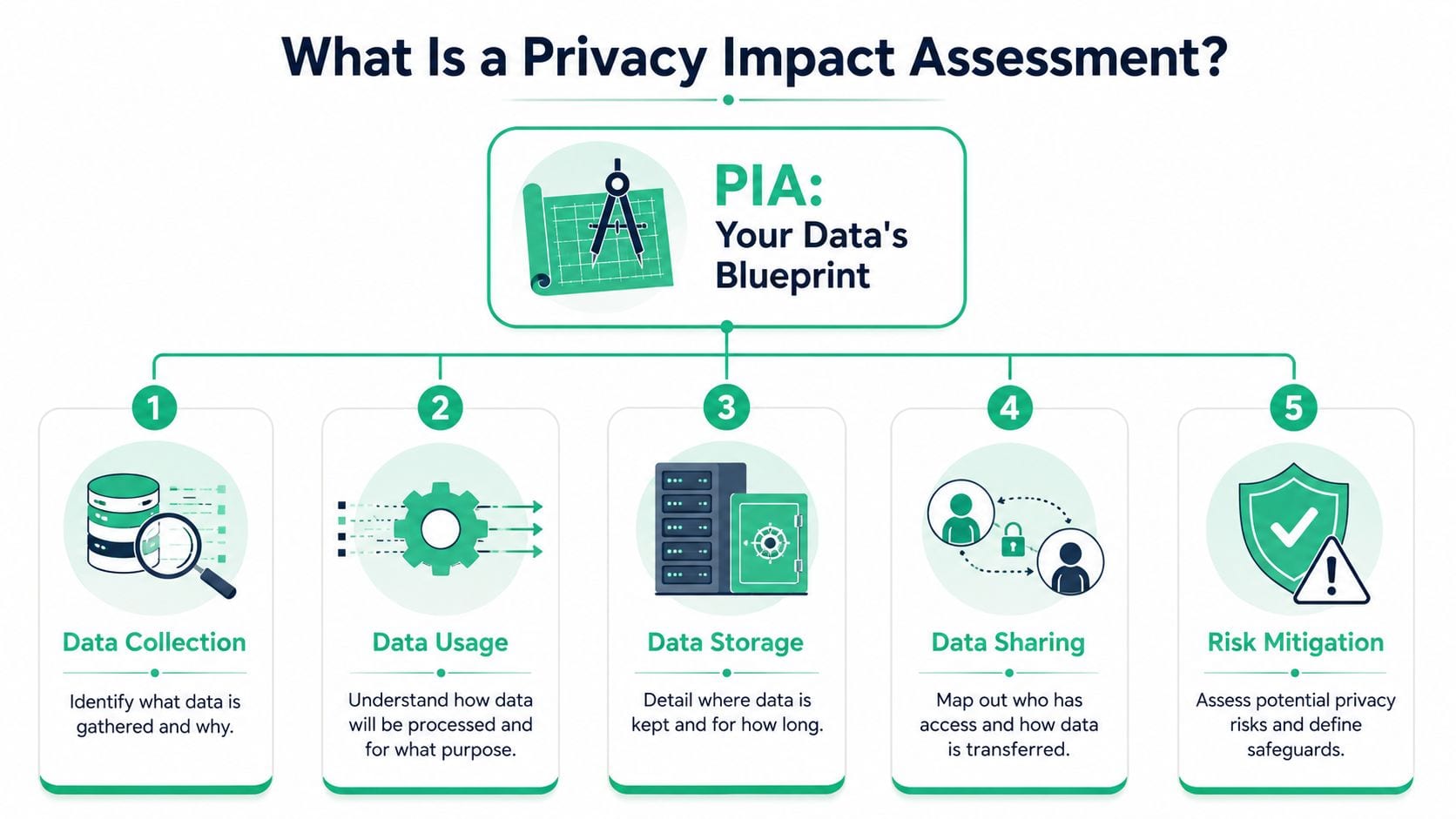
Think of a privacy impact assessment as the blueprint for your data architecture. Before a builder pours concrete, they need to know load points, materials, access paths, and safety requirements. Before an analytics team deploys tracking, it needs the same discipline for data.
A PIA documents how personal information is collected, used, stored, shared, and protected. It also forces a decision on whether the processing is justified in the first place. That matters because many analytics problems aren't caused by a broken tool. They're caused by collecting more than the team can explain or control.
The core parts of a usable PIA
A valid PIA needs enough detail to guide implementation, not just satisfy review. In practice, that means covering seven concrete elements, summarized clearly in Osano's overview of privacy impact assessment requirements:
- Purpose and scope: What the project does and why the data collection exists.
- Data details: The type of personal information involved, including sensitivity and volume.
- Flow mapping: Entry points, storage locations, and transmission paths.
- User expectations: Whether the data use matches what a person would reasonably expect.
- Potential harms: Negative impacts on privacy rights if something goes wrong.
- Safeguards: Controls such as encryption, retention limits, minimization, and access restrictions.
- Final determination: Whether the business benefit outweighs residual privacy risk.
What this means for analytics teams
For a digital analytics implementation, those elements translate into very operational questions:
| PIA element | Analytics example |
|---|---|
| Purpose | Why does this event exist at all? Attribution, personalization, fraud prevention, reporting? |
| Data involved | Does the payload include email, phone, order data, location, or IDs? |
| Data flow | Does data move from website to GTM to GA4 to ad platforms to warehouse tools? |
| Expectations | Would a user expect this event to be shared with advertising tools? |
| Risk | Could query strings, form fields, or custom dimensions leak personal data? |
| Controls | Are fields masked, blocked, transformed, or limited by consent state? |
Practical rule: If your PIA can't tell an engineer what to allow, block, mask, or monitor, it's too abstract.
Teams that need help aligning policy and implementation usually benefit from grounding the work in analytics-specific privacy controls, such as those covered in Trackingplan's guide to privacy and compliance in digital analytics.
Why Your Analytics Team Needs a PIA
Analytics teams often resist PIAs because they sound administrative. In practice, a strong privacy impact assessment does three jobs that matter directly to delivery: it reduces avoidable risk, improves the quality of the data model, and prevents expensive rework.
The business case for PIAs is often underestimated. Organizations that consistently perform PIAs see a 45% reduction in the severity and frequency of data breaches, and the average US data breach costs $15.4 million, according to the Ponemon Institute research library.
Better governance usually means better analytics
Bad privacy design and bad analytics design often show up together. If a team can't explain why it collects a field, who receives it, or how long it's retained, that same team usually has weak event definitions, inconsistent naming, and poor destination control.
A PIA forces cleanup early:
- Unnecessary fields get removed: Teams stop passing values that don't support a clear business use case.
- Event design improves: Naming, ownership, and destination rules become more explicit.
- Vendor decisions get sharper: Teams distinguish between essential processing and “maybe useful later” collection.
- Consent implementation gets more realistic: Legal requirements are translated into actual technical conditions.
It protects speed, not just compliance
A lot of people assume PIAs slow projects down. The opposite is usually true when teams work in sprints. Late privacy review creates delays because the implementation is already live in a staging or production environment before anyone has mapped the risk.
A PIA shifts those conversations earlier, when changes are cheap. Removing a risky field from the dataLayer spec is easy. Finding that same field after it has reached analytics tools, ad platforms, and reporting dashboards is much harder.
Teams don't lose time because they did a PIA. They lose time because they skipped one and had to reverse engineer the stack under pressure.
Trust is also an operational asset
Customer trust is often discussed in soft terms, but for analytics teams it shows up in very practical ways. Teams with disciplined privacy controls are more likely to keep clean dashboards, pass internal audits, and avoid emergency tag rollbacks that damage reporting continuity.
A PIA won't solve every data governance problem. But it gives analytics, engineering, and compliance a shared operating document. That alone removes a lot of friction from launches.
When Is a PIA Legally Required
Not every analytics project requires a formal DPIA or equivalent risk assessment. But many modern MarTech use cases move into that territory faster than teams expect, especially when they combine profiling, sensitive data, broad tracking, and new decisioning systems.
Under GDPR Article 35, a DPIA is mandatory if processing is likely to result in a high risk, including cases such as systematic monitoring or large-scale processing of special data categories. Non-compliance can lead to fines of up to €20 million or 4% of global annual turnover, as summarized in this guide to GDPR privacy impact assessment obligations.
Common triggers under GDPR
For analytics and marketing teams, the most relevant triggers usually include:
- Systematic monitoring: Behavioral tracking across websites, apps, or public-facing environments.
- Large-scale sensitive data processing: Health, biometric, genetic, or similar special category data at scale.
- Automated decision-making: Profiling or scoring that carries legal or similarly significant effects.
- New technology use: AI, biometrics, and other emerging processing methods that raise new privacy risks.
- Combined high-risk factors: Multiple criteria together often make the DPIA obligation hard to avoid.
The operational trap is assuming that “analytics” is automatically low risk. It isn't. Once tracking is tied to identity, segmentation, ad sharing, or significant downstream decisions, the risk profile changes.
GDPR and CCPA side by side
California is moving in a similar direction through mandatory risk assessment obligations for certain processing. If your team operates globally, a side-by-side view helps.
| Triggering Condition | GDPR (DPIA) | CCPA (Risk Assessment) |
|---|---|---|
| Systematic monitoring | Trigger for high-risk review | Can be relevant when tied to systematic observation and significant decisions |
| Sensitive personal data | Large-scale processing can require DPIA | Processing sensitive personal information can trigger assessment |
| Selling or sharing personal information | May contribute to broader risk analysis | Explicit trigger under updated regulations |
| Automated decision-making | Trigger when legal or similarly significant effects exist | Trigger when ADMT is used for significant decisions or inferences |
| New technology | Innovative use can increase risk and require DPIA | Risk assessment can be required when processing creates significant privacy risk |
| Reassessment after change | Repeated periodically when risk remains high | Must be updated within 45 calendar days of a material change under the cited summary |
The CCPA side matters because teams often treat California requirements as mainly notice and opt-out obligations. That's too narrow. The updated California regulations, effective January 2026, require a risk assessment for processing that presents significant privacy risk, including selling or sharing personal information, processing sensitive personal information, and certain uses of automated decision-making technology, according to Potomac Law's summary of why privacy impact assessments must anchor privacy programs.
What to check before launch
If your analytics stack involves international vendors, remote operations, or distributed teams, data handling can become harder to control in practice. Teams working across restrictive network environments should also think through secure operational access patterns, especially where cross-border tooling is involved. Throughwire's piece on secure VPN use in China is a practical reference for that kind of environment.
For cookie and tag governance, it also helps to audit the implementation details before legal review starts. This walkthrough on GDPR cookie compliance audit steps and pitfalls is useful when the trigger question depends on what fires, not what the policy says should fire.
How to Conduct a PIA for Digital Analytics
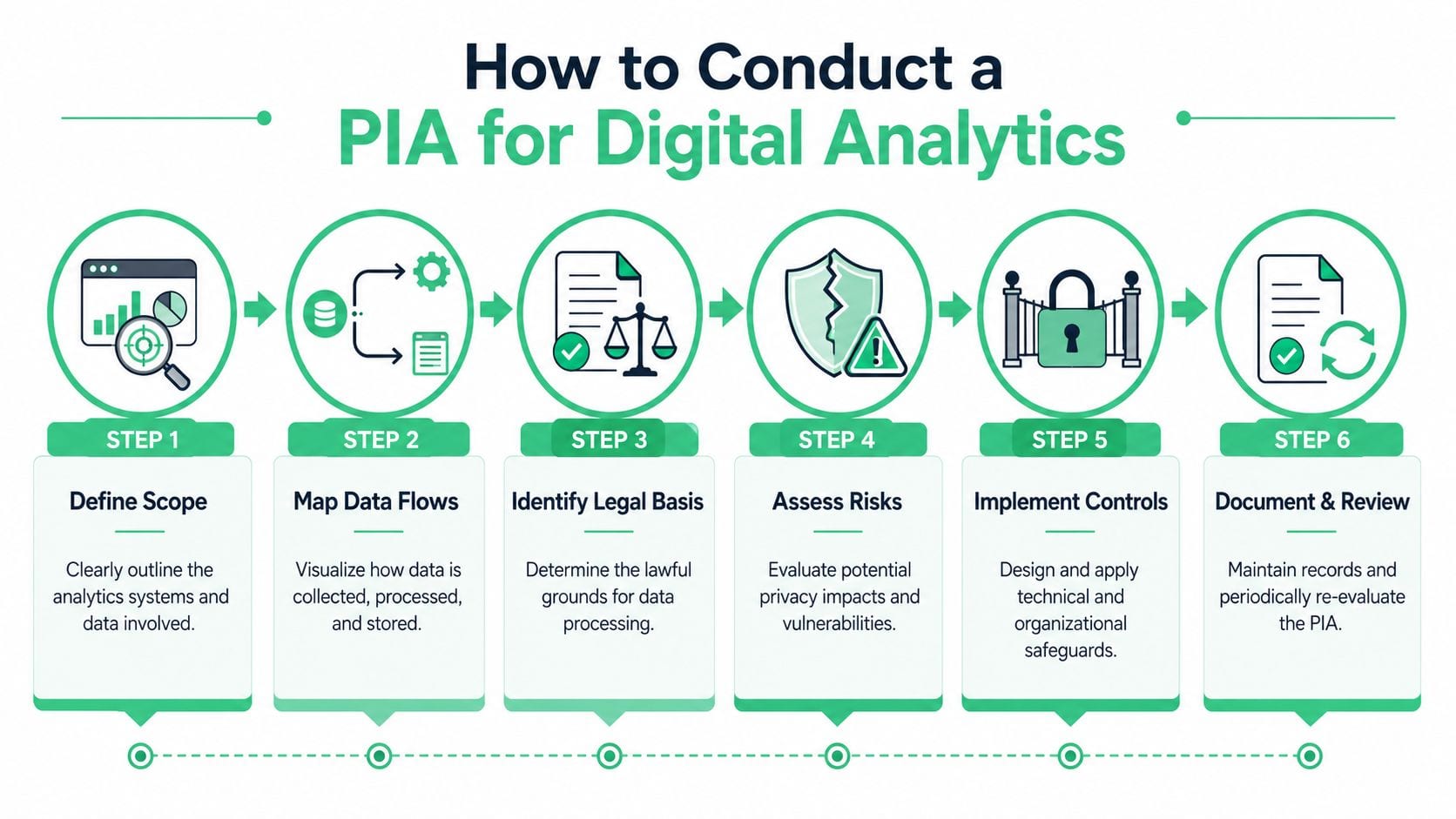
A privacy impact assessment for digital analytics should be concrete enough that an engineer can implement it and a reviewer can audit it. If the document stays at the level of “we value privacy,” it won't help when a form submission leaks into a pixel or a new destination appears without review.
A valid PIA must document the full data flow from collection to deletion and define mitigation measures such as encryption and access logging. It also needs to identify risks like rogue events or schema mismatches in MarTech stacks, as outlined by NIST CSRC guidance on privacy and risk documentation.
Start with a threshold assessment
Before writing a full assessment, confirm whether the project handles personal data at all and whether the risk level justifies a formal process.
Ask basic but specific questions:
- What identifiers exist: Email, phone, user ID, cookie ID, device ID, location, or account references.
- Where they appear: In page URLs, dataLayer objects, API payloads, SDK events, or destination mappings.
- Why they are needed: Measurement, support, fraud prevention, personalization, or audience building.
- Who receives them: Internal tools, agencies, cloud services, ad platforms, CDPs, or warehouses.
If the team can't answer those questions quickly, that's already a warning sign. Uncertainty itself is a governance risk.
Map the actual data flow
This is a step often oversimplified; collection is documented at the website or app, and the process stops there. A real analytics PIA should trace the data path through every meaningful stage.
That usually includes:
- Collection point on web, app, or server
- Transformation layer in tag manager, SDK rules, or middleware
- Destination tools such as GA4, Adobe Analytics, Mixpanel, Segment, Meta, or other ad platforms
- Storage and retention in logs, vendor systems, exports, and data warehouses
- Deletion or suppression paths when consent changes or retention periods expire
If your map ends at “sent to analytics,” you don't have a map. You have a partial diagram.
Identify risks in analytics-specific terms
Legal teams often write risk categories broadly. Analytics teams need them translated into implementation issues.
Look for problems such as:
- PII in URLs: Search parameters, checkout values, or account details passed in query strings.
- Consent bypasses: A script fires before the CMP state is available or ignores regional logic.
- Rogue pixels: A tag appears through a plugin, CMS widget, or agency container with no review trail.
- Schema drift: Event properties change names, types, or allowed values after launch.
- Unexpected sharing: A field meant for internal analytics also reaches ad or attribution destinations.
- Weak minimization: Payloads carry raw values where hashed, masked, or omitted data would be enough.
Define controls that teams can enforce
The PIA should finish with controls that are testable. Good controls are specific enough to validate in QA and production.
Examples include:
| Risk area | Control example |
|---|---|
| Query-string leakage | Block or scrub defined parameters before dispatch |
| Sensitive field exposure | Mask, hash, or remove values before sending |
| Unauthorized destinations | Maintain an approved vendor list and block undeclared tags |
| Consent mismatch | Fire destination-specific tags only after valid consent state |
| Schema changes | Validate event names and properties against approved definitions |
| Retention sprawl | Set retention rules by tool and document deletion workflow |
For teams that want a working starting point, this privacy impact assessment template for digital analytics helps convert policy requirements into implementation detail.
Review with the right people
A PIA for analytics shouldn't be owned by legal alone. It needs input from the people who can confirm how data behaves.
Include:
- Analytics owners for event purpose and destination design
- Engineers or tag managers for implementation logic
- Privacy or legal for lawful basis and regulatory interpretation
- Security or governance for controls, access, and retention
- Marketing stakeholders for vendor use and campaign dependencies
Visual learners often benefit from implementation walkthroughs rather than policy documents alone. Trackingplan's YouTube channel has practical videos that can help teams understand analytics validation and observability workflows in a more applied way.
Automating PIA Controls with Observability Tools
The biggest weakness in a traditional privacy impact assessment is timing. The document is usually written before launch, approved, archived, and then gradually detached from the implementation it was meant to govern.
That approach breaks down in modern analytics stacks because the stack doesn't stay still. The real-time observability gap is significant: 78% of data breaches stem from post-deployment changes to MarTech stacks that static PIAs miss, and 65% of event schemas change monthly, as noted earlier from NIST guidance.
Why static PIAs age so fast
The PIA may say “no email in event payloads” or “only approved destinations may receive conversion events.” But after launch:
- a developer adds a new field to the dataLayer,
- a marketer deploys a partner pixel,
- a plugin updates its tracking behavior,
- a consent condition changes by region,
- or a server-side mapping starts forwarding more data than intended.
None of those changes automatically update the original document. That's why many teams have compliant paperwork and non-compliant production behavior.
What continuous PIA looks like
The practical answer is to convert PIA decisions into ongoing technical checks. Instead of treating the assessment as a one-time artifact, teams can use observability to enforce its rules over time.
That means monitoring for things like:
- Unauthorized fields: Detecting personal data where the PIA says none should exist.
- Undeclared destinations: Catching vendors or pixels that were never approved.
- Schema violations: Alerting when event names or properties drift from the approved model.
- Consent failures: Verifying that tags and destinations respect consent state in live traffic.
A PIA defines the policy. Observability checks whether production still follows it.
One practical option is Trackingplan's data observability approach, which monitors analytics and marketing implementations, discovers changes across the stack, and helps teams validate issues such as PII leaks, rogue events, and consent misconfigurations against expected behavior.
Where automation helps most
Automation is most valuable where manual reviews are weakest:
| Manual review limit | Observability advantage |
|---|---|
| Point-in-time checks | Ongoing detection after release |
| Limited test scenarios | Visibility into live environments |
| Spreadsheet-based rules | Enforceable validations and alerts |
| Hard-to-track vendor drift | Discovery of new or changed destinations |
This is the missing layer in many privacy programs. The document explains intended behavior. The monitoring layer verifies actual behavior.
Conclusion From Document to Dynamic Process
A privacy impact assessment still matters. It gives teams the structure to define purpose, map data flows, identify risk, and approve controls before launch. Without that foundation, analytics governance turns reactive very quickly.
But a static document isn't enough for a stack that changes every sprint. Tags get added. Schemas drift. Vendors change. Consent logic breaks in edge cases. If the PIA never reconnects to the live implementation, it becomes a historical record instead of a control mechanism.
The practical model is simple. Use the PIA to decide what data practices are acceptable. Then connect those decisions to QA, monitoring, and observability so the rules keep working after release.
That's how privacy stops being an annual review exercise and becomes part of analytics operations. Teams that make that shift are usually faster, clearer, and less exposed when the next launch gets complicated.
If your team wants to turn privacy requirements into live analytics controls, Trackingplan is worth evaluating. It helps teams monitor analytics and marketing data flows continuously, detect issues like rogue events, schema changes, consent misconfigurations, and potential PII leaks, and keep the implementation aligned with the rules defined in a privacy impact assessment.