
Many marketers treat conversion tracking as simple click counting, but this oversimplification costs businesses millions in wasted ad spend annually. Effective conversion tracking is a sophisticated measurement framework that connects every dollar invested to tangible business outcomes. Whether you’re optimizing campaigns across multiple channels or proving ROI to stakeholders, understanding how conversion tracking actually works separates guessing from genuine growth. This guide reveals the technical mechanics, attribution nuances, and validation strategies that transform raw data into actionable insights for digital marketing professionals.
Table of Contents
- Key takeaways
- What is conversion tracking and why it matters
- How conversion tracking works: tagging and attribution models
- Nuances and challenges: comparing tracking methods and data accuracy
- Best practices for implementing and optimizing conversion tracking
- Enhance your conversion tracking with Trackingplan
- Frequently asked questions
Key Takeaways
| Point | Details |
|---|---|
| Purpose of conversion tracking | Conversion tracking measures valuable user actions after marketing interactions to evaluate campaign effectiveness and prove ROI. |
| Tagging and attribution models | Page tagging uses pixels or scripts placed on key conversion pages, and attribution models link clicks to later conversions to assign credit. |
| Clicks are not outcomes | Many marketers treat conversions as clicks, but clicks reflect intent rather than actual business results. |
| Data driven decision making | Accurate conversion data enables data driven decision making and smarter budget allocation. |
| Implementation and validation tips | Practical tips include using tag management tools, validating data through QA checks, and testing across devices. |
What is conversion tracking and why it matters
Conversion tracking monitors and measures specific valuable user actions on websites or apps after interacting with marketing campaigns, such as purchases, form submissions, or sign-ups, to evaluate campaign effectiveness and prove ROI. This process captures the moment a prospect becomes a customer, a visitor becomes a lead, or any other action that moves your business forward.
Typical conversion actions include completed purchases, submitted contact forms, newsletter subscriptions, app downloads, phone calls, account registrations, and video views beyond specific thresholds. Each represents a measurable business outcome tied directly to marketing investment.
Accurate tracking is critical for data-driven decision making and budget allocation. Without reliable conversion data, you’re flying blind, unable to distinguish high-performing campaigns from budget drains. Marketing teams need precise attribution to optimize spend, improve targeting, and demonstrate value to leadership.
Common misconceptions plague conversion tracking. Many believe it’s only about counting clicks, but clicks represent intent, not outcomes. Others assume all tracking methods capture data equally, ignoring significant differences in accuracy between approaches. Some marketers trust default platform settings without validation, leading to systematic undercounting of actual conversions.
Key benefits for marketers and analysts include:
- Identifying which campaigns, keywords, and channels drive actual business results
- Calculating true cost per acquisition and customer lifetime value
- Optimizing bidding strategies based on conversion probability
- Allocating budget to highest-performing initiatives with confidence
- Testing creative variations and landing pages with measurable outcomes
“The difference between businesses that scale profitably and those that burn cash often comes down to conversion tracking accuracy. When you know exactly what works, every decision becomes clearer.”
Understanding conversion tracking fundamentals transforms marketing from creative guesswork into scientific optimization. The technical implementation determines whether your data reflects reality or presents a distorted picture of campaign performance.
How conversion tracking works: tagging and attribution models
Page tagging uses pixels or scripts placed on key conversion pages like thank-you screens or order confirmations. When a user reaches these pages, the tag fires, sending conversion data back to your analytics or advertising platform. This simple mechanism forms the foundation of all conversion measurement.

Tools like Google Tag Manager simplify tag management by providing a centralized interface for deploying, updating, and organizing tracking codes across your digital properties. Instead of manually editing website code for each new tag, marketers use GTM’s visual interface to add conversion pixels, adjust triggers, and test implementations without developer involvement.
Linking ad clicks or impressions to conversions requires parameters like GCLID (Google Click Identifier) appended to destination URLs. When someone clicks your ad, the platform adds a unique identifier to the landing page URL. If that user later converts, the conversion tag reads this parameter and attributes the action back to the original ad click, campaign, and keyword.
Attribution models determine how credit is assigned when multiple touchpoints occur before conversion. Marketing attribution answers which interactions deserve recognition for driving the final action.
| Attribution model | How credit is assigned | Complexity | Best for |
|---|---|---|---|
| Last-click | 100% to final touchpoint | Simple | Short sales cycles, direct response |
| First-click | 100% to initial touchpoint | Simple | Brand awareness, top-of-funnel focus |
| Linear | Equal credit to all touchpoints | Moderate | Understanding full journey |
| Time decay | More credit to recent touchpoints | Moderate | Longer consideration periods |
| Data-driven | Algorithmic based on actual patterns | Complex | Sufficient conversion volume |
| Position-based | 40% first, 40% last, 20% middle | Moderate | Balancing acquisition and conversion |
Typical steps to implement tagging and set attribution in campaigns:
- Identify all conversion actions that matter for your business goals
- Install base tracking code on all pages if not already present
- Add conversion-specific tags to thank-you pages, confirmation screens, or success events
- Configure conversion actions in your advertising platform with appropriate values
- Set up URL parameters or auto-tagging to track traffic sources accurately
- Choose an attribution model aligned with your sales cycle and business model
- Test tag firing using browser extensions or platform debugging tools
- Monitor initial data for 7-14 days to identify any tracking gaps or errors
Pro Tip: Validate tags regularly using browser developer tools or specialized testing platforms. A broken tag can silently lose conversion data for weeks before anyone notices, making historical analysis impossible and current optimization unreliable.
After migrating to GA4, many marketers discovered their attribution settings needed reconfiguration. Platform updates frequently change default behaviors, making ongoing validation essential rather than optional.
Nuances and challenges: comparing tracking methods and data accuracy
Client-side tracking captures only 60-70% of actual conversions while server-side methods reach 95-99% accuracy. This dramatic difference stems from browser-based limitations like ad blockers, privacy settings, JavaScript errors, and page abandonment before tags fire. Client-side pixels execute in the user’s browser, making them vulnerable to any interference between the user and your tracking code.
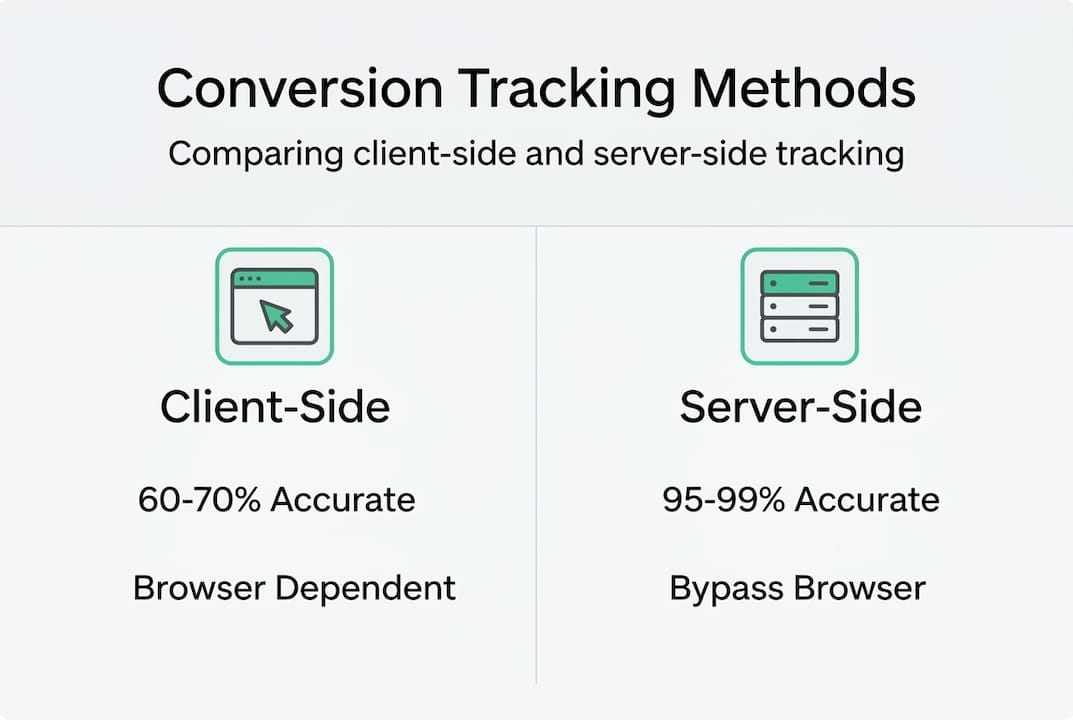
Server-side tracking sends conversion data directly from your servers to analytics platforms, bypassing browser restrictions entirely. When a purchase completes on your backend, your server notifies the tracking platform regardless of what’s happening in the user’s browser. This approach dramatically improves data accuracy but requires more technical implementation.
GA4 conversion imports for Google Ads bidding present limitations compared to native tag setups. Imported conversions lack the real-time granularity that native tags provide, creating delays in bidding algorithm optimization. Smart Bidding strategies perform best with immediate conversion signals, not data imported hours later through batch processes.
| Attribution approach | Accuracy level | Data requirements | Implementation complexity | Bidding optimization |
|---|---|---|---|---|
| Rule-based last-click | Low to moderate | Minimal | Simple | Basic |
| Data-driven | High | Substantial volume | Moderate | Advanced |
| Algorithmic | Highest | Large datasets | Complex | Superior |
| GA4 imports | Moderate | Platform integration | Moderate | Limited |
| Native platform tags | High | Proper implementation | Low to moderate | Optimal |
Common challenges causing data loss or inaccuracies include:
- Ad blockers preventing pixel execution on 25-40% of browsers
- Privacy regulations limiting cookie lifespan and cross-domain tracking
- Single-page applications where traditional pageview-based tracking fails
- Mobile app conversions disconnected from web-based ad clicks
- Cross-device journeys where users research on mobile but convert on desktop
- Tag management errors like duplicate firing, missing triggers, or incorrect parameters
- Platform API changes that silently break existing integrations
Pro Tip: Combine tracking methods strategically. Use client-side tags for immediate user experience personalization and server-side tracking for accurate conversion counting. This hybrid approach maximizes both speed and reliability while providing redundancy if one method fails.
“Algorithmic attribution represents the gold standard in conversion tracking, analyzing vast datasets to identify true causation rather than simple correlation. While rule-based models apply predetermined logic, algorithms continuously learn from actual conversion patterns across millions of interactions.”
Understanding why tracking accuracy matters helps prioritize investment in robust measurement infrastructure. A 30% undercounting of conversions doesn’t just skew reports; it causes bidding algorithms to undervalue campaigns, leading to reduced budget allocation for your best-performing initiatives. The compounding effect of inaccurate data creates a downward spiral where successful campaigns appear mediocre.
Marketing attribution becomes exponentially more complex as customer journeys span multiple devices, channels, and timeframes. Simple models fail to capture reality, while sophisticated approaches require data infrastructure many organizations lack.
Best practices for implementing and optimizing conversion tracking
Using Google Tag Manager for tag deployment streamlines the entire tracking lifecycle. GTM provides version control, allowing you to roll back problematic changes instantly. Built-in debugging tools show exactly when tags fire, what data they send, and whether triggers activate correctly. For teams managing dozens of tags across multiple platforms, GTM transforms chaos into organized, auditable processes.
Data-driven attribution models analyze actual conversion paths to assign credit proportionally based on statistical contribution. Unlike arbitrary rules, these models identify which touchpoints genuinely influence outcomes. They require sufficient conversion volume, typically 400+ conversions per month, to generate reliable insights. Below this threshold, simpler models may produce more stable results.
Ongoing validation and debugging of conversion tags prevents silent failures that corrupt your data for weeks before detection. Implement these practical steps:
- Schedule monthly tag audits using automated testing tools
- Monitor conversion rates for unexpected drops that signal tracking issues
- Compare platform-reported conversions against backend transaction records
- Test tag firing after website updates, redesigns, or platform migrations
- Document all tracking implementations with trigger conditions and expected behavior
- Set up alerts for zero-conversion days or dramatic rate changes
- Review data layer consistency across pages and user flows
- Validate that conversion values match actual transaction amounts
Machine learning-powered attribution excels in multi-touch analysis when data volume permits. These systems identify patterns humans miss, like the surprising importance of mid-funnel content interactions or the diminishing returns of excessive ad frequency. However, they require substantial data: thousands of conversions across diverse customer journeys. Organizations with limited volume should focus on foundational accuracy before pursuing advanced attribution.
Pro Tip: Integrate data quality tools that continuously monitor your analytics implementation. Automated systems catch tracking errors within hours rather than weeks, preventing corrupted data from influencing critical business decisions. The cost of monitoring tools is negligible compared to budget wasted on campaigns optimized against inaccurate data.
Prioritizing accuracy over vanity metrics transforms marketing performance. Many teams celebrate increasing conversion counts without questioning whether their tracking captures reality. A reported 20% improvement means nothing if half your actual conversions go untracked. Conversion tracking tools should emphasize reliability and validation features, not just ease of initial setup.
Data quality forms the foundation of every marketing decision. Sophisticated bidding strategies, personalization engines, and attribution models all depend on accurate input data. Garbage in, garbage out applies ruthlessly in digital marketing. Organizations that invest in measurement infrastructure consistently outperform competitors who treat tracking as an afterthought.
Measuring marketing effectiveness requires more than installing tags and hoping for the best. Establish baseline metrics, implement robust tracking, validate continuously, and iterate based on learnings. This disciplined approach separates marketing teams that scale profitably from those that simply scale spending.
Enhance your conversion tracking with Trackingplan
Even perfectly configured conversion tracking fails when tags break, schemas drift, or implementations degrade over time. Trackingplan provides automated discovery, monitoring, and auditing of your entire analytics stack, catching tracking errors before they corrupt your data and mislead your optimization efforts.
Our platform continuously validates that conversion tags fire correctly, data reaches the right destinations, and schema changes don’t silently break integrations. Real-time alerts via email, Slack, or Teams notify your team instantly when anomalies occur, enabling rapid diagnosis and correction.
Explore how digital analytics tools integrate seamlessly with Trackingplan’s monitoring capabilities. Our tag management solutions work alongside your existing infrastructure, providing an always-on validation layer that catches issues other platforms miss. Discover how Trackingplan works to maintain tracking accuracy without constant manual audits.
Frequently asked questions
What types of user actions are tracked as conversions?
Conversions include any valuable user action aligned with business goals: completed purchases, form submissions, phone calls, app downloads, account registrations, video views beyond thresholds, and newsletter subscriptions. Each organization defines conversions based on what moves prospects through their specific funnel. Conversion tracking captures these moments when marketing investment produces measurable business outcomes.
How does data-driven attribution improve ROI measurement?
Data-driven attribution analyzes actual conversion paths to assign credit based on statistical contribution rather than arbitrary rules. This approach identifies which touchpoints genuinely influence outcomes, revealing hidden value in mid-funnel interactions that last-click models ignore. By understanding true impact across the customer journey, marketers allocate budget more effectively and optimize campaigns based on comprehensive performance rather than oversimplified metrics.
What are the main differences between client-side and server-side tracking?
Client-side tracking executes in user browsers, making it vulnerable to ad blockers, privacy settings, and JavaScript errors, typically capturing only 60-70% of conversions. Server-side tracking sends data directly from your servers to analytics platforms, bypassing browser restrictions entirely and achieving 95-99% accuracy. Server-side requires more technical implementation but provides dramatically more reliable data for critical business decisions.
How can marketers validate their conversion tracking is working properly?
Validation requires multiple approaches: use browser developer tools to confirm tags fire on conversion pages, compare platform-reported conversions against backend transaction records, monitor for unexpected rate drops, test after website changes, and implement automated monitoring tools. Schedule regular audits rather than one-time checks, as tracking degrades over time through platform updates, code changes, and configuration drift. Continuous validation catches issues within hours rather than weeks.