
TL;DR:
- Ecommerce data quality involves maintaining accurate, consistent, and complete product and event data to enable reliable decision-making. Teams that treat it as infrastructure, using canonical records, layered validation, and continuous monitoring, achieve higher accuracy and fewer errors. Ongoing ownership, regular KPI tracking, and automated alerts are essential for sustaining high data integrity over time.
Ecommerce data quality is defined as the degree to which your product records, event tracking, and analytics outputs are accurate, consistent, and complete enough to drive reliable decisions. Most teams treat it as a cleanup task. The teams that win treat it as infrastructure. When your GA4 purchase events silently drop, your Meta Pixel double-counts conversions, or your product feed rejects SKUs for missing attributes, every downstream decision, from ad spend to inventory, is built on a broken foundation. This guide covers the four technical pillars to optimize ecommerce data quality: canonical product modeling, pre-publish validation, event deduplication, and continuous monitoring.
How to optimize ecommerce data quality with a canonical product record
A canonical product record is the single authoritative representation of a product, serialized consistently into every machine-readable surface your business touches. This includes your Google Merchant Center feed, your GA4 ecommerce events, your structured data markup, and your internal analytics. Without it, the same product might carry three different titles, two different GTINs, and inconsistent category taxonomy depending on which system generated the output. That inconsistency is not just an aesthetic problem. It degrades search visibility, breaks feed eligibility, and makes attribution analysis unreliable.

Quality in ecommerce data pipelines requires building a durable canonical product entity rather than just normalizing fields at export time. The distinction matters because normalization at export is reactive. Canonical modeling is structural. Every downstream system reads from the same record, so errors propagate once and get fixed once.
What a canonical record must contain
A production-grade canonical record includes at minimum:
- Stable global identifiers: GTIN, MPN, and your internal SKU, all mapped to each other and locked against arbitrary changes
- Packaging hierarchy: unit, inner pack, and case-level data for accurate inventory and shipping logic
- Taxonomy classifications: Google product category, your internal category tree, and any channel-specific classifications
- Variant structure: parent-child relationships with complete attribute sets per variant (size, color, material)
- Completeness scores: field-level flags that gate feed exports when required attributes are missing
Shopify recommends combining structured product data with Merchant Center feeds to maintain consistency across search, filtering, recommendations, and paid ad eligibility. Incomplete or inconsistent fields directly reduce conversion and visibility. That is not a theory. It is the operational reality for any catalog running more than a few hundred SKUs.
Pro Tip: Assign a data steward to each product category. Automated rules catch format errors, but human stewardship catches semantic errors, like a product miscategorized because its title is ambiguous.
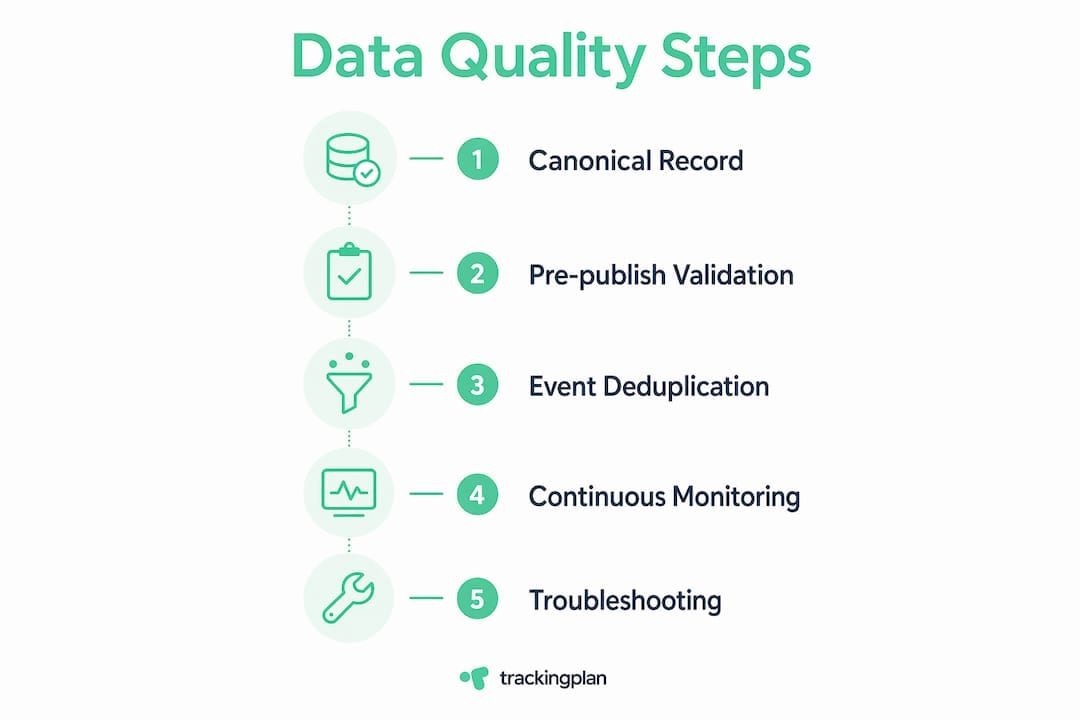
Data Wizards emphasizes measuring canonical match rate and feed rejection rate continuously rather than running one-off audits. A canonical match rate below 95% means your analytics and your feeds are describing different products, and your reporting is unreliable by definition.
| Canonical field | Why it matters |
|---|---|
| GTIN / MPN | Enables deduplication across feeds and attribution systems |
| Google product category | Controls ad eligibility and search classification |
| Variant attribute completeness | Prevents feed rejection and filtering failures |
| Completeness score | Gates export and triggers stewardship workflows |
What validation strategies prevent broken product data from reaching channels?
Pre-publish validation is the process of catching data errors before they reach your feeds, your storefront, or your analytics layer. The most effective approach combines three layers: deterministic rules, AI semantic confidence scoring, and human review queues. Each layer handles a different class of error, and none of them is sufficient alone.
The Catalog Validation Framework from Product Lasso recommends organizing validation by risk tier and severity. Not every error deserves the same response. A missing GTIN on a high-volume SKU is a critical defect. A slightly inconsistent bullet point on a low-traffic variant is a low-priority flag. Treating them identically wastes analyst time and creates alert fatigue.
A practical layered pipeline works like this:
- Deterministic rules run first. These check for required fields, format compliance (price as a number, not a string), character limits, and dependency rules (if color exists, size must also exist). Errors here block publication automatically.
- AI semantic scoring runs second. This flags records where the title, description, and category are internally inconsistent, even if all required fields are present. A product titled “Men’s Running Shoe” categorized under “Women’s Apparel” passes deterministic rules but fails semantic review.
- Human review handles escalations. Records that fail semantic scoring above a confidence threshold go to an analyst queue. Records that fail deterministic rules go to an escalation queue with root-cause context attached.
- Auto-approval handles clean records. Records that pass all layers publish without human intervention, which is the only way to scale validation across large catalogs.
Track two metrics to measure pipeline health: first-pass validation rate (the percentage of records that pass all layers without revision) and defect escape rate (the percentage of errors that reach a live channel). Field-level quality checklists that score completeness and accuracy can gate feed exports and support weekly KPI monitoring per SKU. A healthy first-pass rate sits above 90%. A defect escape rate above 2% signals that your deterministic rules are incomplete.
Pro Tip: Build your validation rules from your actual rejection logs, not from documentation. The errors that reach your channels are the errors your current rules do not cover.
For teams managing product pages alongside feeds, optimizing product page data for both SEO and conversion requires the same field discipline as feed validation. The structured data on your product page and the data in your Merchant Center feed must match, or Google treats the discrepancy as a trust signal against you.
How do you deduplicate Meta Pixel and Conversions API events accurately?
Event deduplication between Meta Pixel and the Conversions API (CAPI) is the mechanism that prevents the same conversion from being counted twice when both browser and server fire the same event. The deduplication contract is strict: both events must share the same "event_nameandevent_id`, and the server-side event must arrive within 48 hours of the browser event. Failing this contract inflates conversion volume by 50 to 80%, which directly distorts ROAS reporting and misguides budget allocation.
The most common failure mode is not a missing event_id. It is a mismatched one. Teams often generate a UUID client-side, pass it to the Pixel, and then generate a different UUID server-side for CAPI. Both events fire. Neither deduplicates. Meta counts two purchases.
The fix is architectural, not cosmetic:
- Use your backend’s stable order ID as the
event_idfor Purchase events. It is already unique per transaction and available on both sides. - Pass the order ID from your server to your browser confirmation page and inject it into the Pixel’s
fbq('track', 'Purchase', {...}, {eventID: orderID})call. - Fire your CAPI event via webhook in real time, not in a batch job. Batch sending causes intermittent dedup failures because the 48-hour window is not the only constraint. Event ordering and processing latency inside Meta’s systems also affect deduplication status.
- Verify deduplication in Meta Events Manager. The target deduplication rate is above 95%. Anything below that means you are reporting inflated conversions to your ad platform.
“Most tracking deduplication issues arise from mismatched event_id mapping, requiring end-to-end verification beyond just firing events.” — Adrienne Vermorel, Meta CAPI Setup Debug
For teams evaluating whether to move more tracking server-side, the comparison of server-side tracking vs. pixel implementations is worth reviewing before committing to an architecture. The deduplication problem does not disappear with server-side tracking. It just moves.
What continuous monitoring practices maintain high data quality over time?
Data quality is not a state you achieve. It is a rate you sustain. Data quality improvement is a continuous loop involving telemetry, controlled experiments, and connecting technical metrics to business impact. The teams that treat it as a one-time project consistently find their quality degrading within two quarters as catalogs grow, tracking implementations drift, and new campaigns introduce untested parameters.
Telemetry should start at pipeline ingestion, not at the reporting interface. By the time a data problem surfaces in a GA4 dashboard, it has already affected decisions. Monitoring at the source, where events are generated and where records enter your pipeline, gives you the lead time to fix issues before they corrupt reports.
Pro Tip: Reconcile your backend order counts against your GA4 BigQuery export weekly. GA4 ecommerce QA often requires this reconciliation because reports may drop or transform events silently due to parameter shape or filtering layers.
The KPIs worth tracking on a weekly cadence are:
| Metric | What it measures | Healthy threshold |
|---|---|---|
| Canonical match rate | Product records consistent across all surfaces | Above 95% |
| Feed rejection rate | SKUs blocked by Merchant Center or channel feeds | Below 2% |
| Defect escape rate | Errors reaching live channels post-validation | Below 2% |
| Deduplication rate | Meta Pixel and CAPI events correctly deduplicated | Above 95% |
| GA4 purchase reconciliation | Backend orders matched to GA4 monetization reports | Within 3% variance |
Trackingplan’s data monitoring capabilities connect these technical metrics to commercial outcomes by surfacing anomalies in real time across GA4, Meta Pixel, and other analytics implementations. When a tracking error causes a 20% drop in reported purchases, you want to know within minutes, not at the end of the week.
What are common challenges when troubleshooting ecommerce data quality?
Even well-designed systems produce recurring failure patterns. Knowing the most common ones lets you diagnose faster and fix at the root rather than the symptom.
- Structured data mismatch: The product title, price, or availability on your product page differs from what is in your Merchant Center feed. Google flags this as a policy violation and can suppress your Shopping ads without a clear error message.
- Batch processing delays causing deduplication failures: If your CAPI integration sends events in hourly batches rather than in real time, some events arrive outside Meta’s deduplication window. The result is inflated conversion counts that look correct in Events Manager but are not.
- GA4 parameter format errors: Passing transaction value as a string instead of a number causes purchases to appear in DebugView but get silently dropped from monetization reports. This is one of the most common causes of GA4 purchase discrepancies and one of the hardest to spot without deliberate QA.
- Consent mode misconfiguration: Cookie blocking and consent mode settings in GA4 can suppress event firing for a significant portion of users, creating a systematic undercount that looks like normal traffic variation.
- Ownership gaps in validation rules: Deterministic validation rules that nobody owns drift out of date as product catalogs evolve. A rule written for a 500-SKU catalog often fails silently on a 5,000-SKU catalog with new attribute requirements.
A marketing data quality audit that covers both product data and tracking implementations will surface most of these issues in a single pass. The audit is not a substitute for ongoing monitoring, but it establishes the baseline every monitoring program needs.
Key takeaways
Optimizing ecommerce data quality requires a canonical product record, layered validation pipelines, strict event deduplication, and continuous telemetry connected to commercial KPIs.
| Point | Details |
|---|---|
| Build a canonical product record | Serialize one authoritative product entity into every feed, schema, and analytics surface. |
| Layer your validation pipeline | Combine deterministic rules, AI semantic scoring, and human review to catch errors before publication. |
| Fix deduplication at the architecture level | Use a stable backend order ID as your Meta Pixel and CAPI event_id to prevent inflated conversions. |
| Monitor telemetry at ingestion, not just reports | Catch data errors at the source before they corrupt dashboards and decisions. |
| Reconcile GA4 against backend orders weekly | Silent event drops in GA4 monetization reports require active reconciliation, not passive trust. |
Why data quality is the compounding asset most ecommerce teams undervalue
I have spent years watching ecommerce teams invest heavily in attribution tools, bidding algorithms, and creative testing, while their underlying data quietly deteriorates. The pattern is consistent. A team launches a new campaign, notices ROAS looks unusually strong, and scales budget. Three weeks later, someone reconciles backend orders against GA4 and finds a 30% overcount from a deduplication failure that started on launch day. The campaign was not performing. The data was lying.
The uncomfortable truth is that data quality work does not produce a visible win. When your canonical match rate is 97% and your deduplication rate is 98%, nothing dramatic happens. Decisions are just quietly better. That invisibility is why it gets deprioritized. Teams optimize for what they can see and celebrate, and data quality rarely generates a dashboard metric that earns applause in a weekly review.
What I have found actually works is treating data quality as a product with its own roadmap and ownership. Not a project that gets done and closed. A product that gets iterated, monitored, and improved on a defined cadence. The teams that do this well assign explicit ownership to each quality metric, review them weekly alongside commercial KPIs, and run controlled experiments when they make changes to their tracking or catalog pipeline. They also resist the temptation to treat schema markup or a new CAPI integration as a complete solution. Those are inputs. The output is a sustained quality rate, and that requires ongoing attention.
The data quality best practices that hold up over time are not the most technically sophisticated ones. They are the ones with clear ownership, measurable thresholds, and a defined response when thresholds are breached.
— David
How Trackingplan helps ecommerce teams maintain reliable analytics
Ecommerce teams that have built solid canonical records and validation pipelines still face one persistent problem: tracking implementations drift. A developer updates a checkout flow, a new tag fires incorrectly, a consent mode change suppresses events for a segment of users. Without automated monitoring, these failures are invisible until they show up as unexplained drops in reported revenue.
Trackingplan monitors your GA4, Meta Pixel, and broader Martech stack in real time, detecting broken pixels, schema mismatches, missing events, and parameter errors the moment they occur. Alerts arrive via Slack, email, or Teams so your team can act before a tracking failure corrupts a week of data. For teams serious about digital analytics data quality, Trackingplan provides the automated audit layer that makes continuous monitoring practical rather than theoretical. You can also explore web tracking monitoring to see how real-time anomaly detection fits into your existing stack.
FAQ
What is ecommerce data quality?
Ecommerce data quality is the accuracy, completeness, and consistency of product records, event tracking, and analytics outputs across all channels. Poor data quality causes feed rejections, inflated conversion counts, and unreliable reporting.
How do I fix GA4 purchase events not showing in reports?
GA4 purchases that appear in DebugView but not in monetization reports are typically caused by parameter format errors, such as passing transaction value as a string instead of a number. Audit your ecommerce event parameters and validate them against GA4’s required schema.
What causes Meta Pixel and CAPI double-counting?
Double-counting occurs when the browser Pixel and the Conversions API fire the same event with different event_id values. Using your backend order ID as a shared event_id on both sides resolves the mismatch and restores accurate deduplication.
How often should I audit my ecommerce data quality?
Weekly monitoring of KPIs like canonical match rate, feed rejection rate, and GA4 purchase reconciliation is the minimum effective cadence. One-off audits catch historical problems but miss the ongoing drift that degrades quality between reviews.
What is a canonical product record?
A canonical product record is the single authoritative version of a product’s data, including identifiers, taxonomy, variants, and completeness scores, serialized consistently into every feed, schema, and analytics surface your business uses.