
Analytics discrepancies create confusion and mislead marketing decisions, costing teams valuable time and budget on campaigns that appear successful but deliver poor results. When Google Analytics shows 10,000 conversions but your CRM records only 8,500, which number drives your strategy? Accurate data is crucial for campaign effectiveness and ROI measurement, yet mismatches between platforms plague even experienced marketing teams. This guide covers how to identify, diagnose, and fix these discrepancies through systematic troubleshooting, proper tool selection, and ongoing validation practices that ensure your marketing data remains reliable and actionable.
Table of Contents
- Key takeaways
- Understanding why analytics discrepancies occur
- Preparing to resolve discrepancies: tools and prerequisites
- Step-by-step process to identify and fix analytics discrepancies
- Verifying resolutions and maintaining data quality
- Unlock better analytics accuracy with Trackingplan
- FAQ
Key Takeaways
| Point | Details |
|---|---|
| Causes of discrepancies | Analytics mismatches stem from tracking tag misfires, inconsistent configurations, sampling, attribution differences, data processing gaps, privacy constraints, and filters across platforms. |
| Systematic troubleshooting | Use a structured approach to identify root causes by comparing raw event logs, verifying when events fire, and aligning platform configurations. |
| Monitoring tools | Employ monitoring and auditing tools with real time alerts to detect tracking changes, missing events, and data schema drift. |
| Validate fixes | After applying changes, confirm accuracy with data validation tests and cross platform reconciliation before trusting metrics. |
Understanding why analytics discrepancies occur
Analytics discrepancies stem from multiple technical and operational factors that compound across your measurement stack. Implementation issues including tracking tag misfires and inconsistent configurations are major causes of data mismatches. When your Google Tag Manager container fires events differently than your server-side tracking, you create parallel data streams that never reconcile.
Technical factors dominate the discrepancy landscape. Tracking code errors occur when tags fail to load due to page speed issues, ad blockers, or JavaScript conflicts. Sampling affects larger datasets where platforms like Google Analytics process only a subset of traffic, creating statistical variance. Configuration differences emerge when one platform counts sessions differently than another, such as varying timeout thresholds or campaign parameter handling.
Data processing differences between platforms contribute substantially to mismatches. Facebook Ads attributes conversions within a 28-day click window by default, while Google Analytics uses last-click attribution with a 6-month window. These fundamental measurement philosophies create inevitable conflicts. User behavior anomalies complicate matters further:
- Bot traffic inflates metrics in some systems while filtered in others
- Cross-device journeys fragment user paths across platforms
- Privacy settings and consent management block tracking inconsistently
- Cache and cookie deletion erases session continuity
Data filters impact reported metrics in ways that cascade through your entire stack. One team member might exclude internal traffic while another forgets, creating permanent divergence. Time zone misalignment causes daily totals to shift between platforms. Currency conversion timing differences affect revenue reporting when exchange rates fluctuate.
“The biggest mistake teams make is assuming all analytics platforms measure the same things the same way. They don’t, and understanding these differences is the first step to resolution.”
Inconsistent definitions and attribution models add confusion that undermines confidence in any single number. What constitutes a “conversion” varies wildly. Your CRM might count only closed deals, your analytics platform tracks form submissions, and your ad platforms claim credit for any page view within their attribution window. Review common analytics issues examples to recognize patterns in your own data.
Preparing to resolve discrepancies: tools and prerequisites
Resolving analytics discrepancies requires proper preparation before you start troubleshooting. Access to analytics platforms and raw data is necessary for meaningful diagnosis. You need admin level permissions in Google Analytics, Adobe Analytics, or whatever platforms you use, plus database access to examine unprocessed event logs. Without raw data access, you’re limited to comparing aggregated reports that hide the underlying problems.

Using monitoring and auditing tools can prevent ongoing discrepancies and improve data quality. These platforms automatically detect when tracking implementations change, when events stop firing, or when data schemas drift from specifications. Real-time alerting catches problems within hours instead of weeks.
Essential tools for discrepancy resolution include:
- Tag debugging extensions like Google Tag Assistant or Adobe Experience Cloud Debugger
- Network monitoring tools to inspect actual HTTP requests and payloads
- Data warehouse access for querying raw event streams
- Spreadsheet software for manual data comparison and analysis
- Version control systems to track implementation changes over time
Understanding your organization’s tracking setup and business goals aids diagnosis significantly. Document which events matter most for your business model. An e-commerce site prioritizes transaction tracking accuracy while a SaaS platform focuses on signup and activation events. Knowing these priorities helps you triage which discrepancies demand immediate attention versus minor variances you can tolerate.
Pro Tip: Create a tracking specification document that defines every event, parameter, and expected value before implementing any fixes. This single source of truth prevents future configuration drift.
Documentation of tagging and configurations is important for efficient troubleshooting. Maintain a current inventory of all tracking implementations:
| Platform | Implementation Method | Owner | Last Updated | Known Issues |
|---|---|---|---|---|
| Google Analytics | GTM + gtag.js | Marketing Ops | 2026-01-15 | Mobile app events missing |
| Facebook Pixel | GTM | Paid Media | 2025-11-22 | Purchase value in wrong currency |
| Mixpanel | Server-side API | Engineering | 2026-02-01 | User ID mapping incomplete |
Gather baseline metrics before starting any resolution work. Export current data from all platforms for the same date range, using identical filters and segments. This baseline lets you measure whether your fixes actually improve alignment or introduce new problems. Understanding the importance of tracking motivates the effort required for thorough preparation.
Step-by-step process to identify and fix analytics discrepancies
Systematic troubleshooting follows a clear sequence that isolates problems efficiently. Start with data comparison, then move progressively deeper into technical implementation until you locate the root cause.
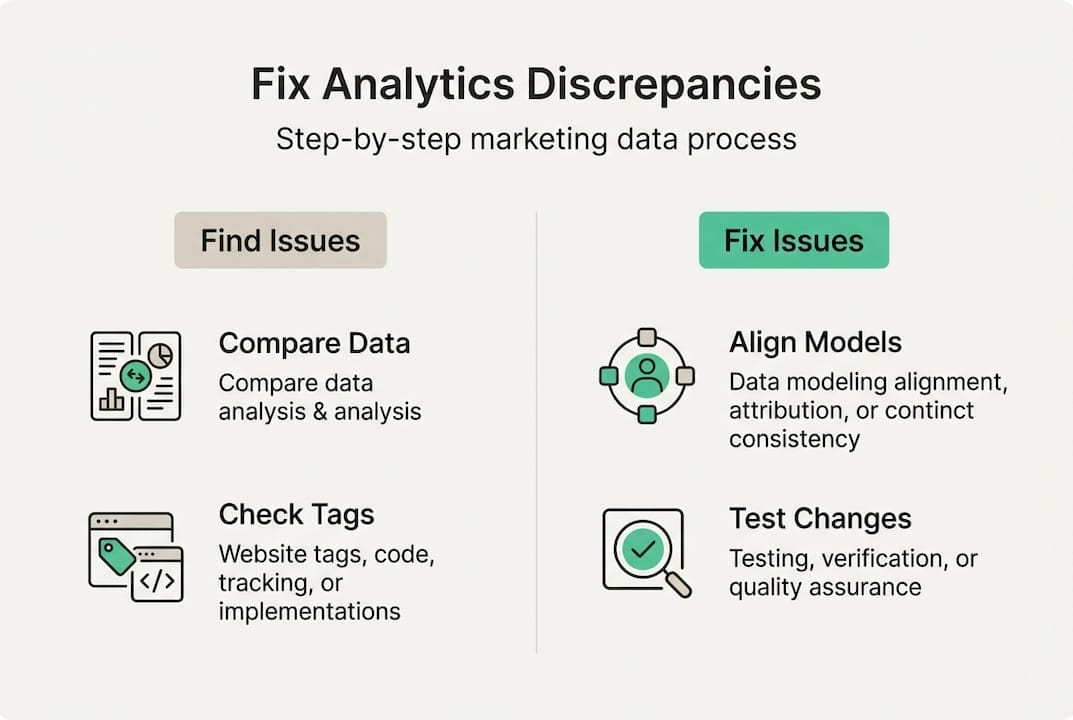
Step 1: Compare data from multiple systems to locate discrepancy patterns. Export identical date ranges from each platform using the same filters. Calculate percentage differences for key metrics like sessions, conversions, and revenue. Small variances under 5% often reflect legitimate measurement differences, while gaps exceeding 10% signal real problems. Look for patterns in when discrepancies occur. Do they spike on weekends? Affect only mobile traffic? Appear after site deployments?
Step 2: Audit tracking tags and event fires for errors or omissions. Use browser debugging tools to watch tags fire in real time as you navigate your site. Verify each critical event triggers correctly and sends complete data. Check for:
- Tags that fail to load due to JavaScript errors
- Events firing multiple times per page view
- Missing required parameters or properties
- Incorrect data types (strings instead of numbers)
- Events firing on wrong pages or user actions
Pro Tip: Test tracking in incognito mode with all browser extensions disabled to eliminate interference from ad blockers or privacy tools that might mask production issues.
Step 3: Review attribution models for consistency and alignment. Systematic troubleshooting and fixing attribution issues improves data reliability. Document the attribution window, model type, and conversion counting method for each platform. Create a comparison table:
| Platform | Attribution Model | Conversion Window | Deduplication Logic |
|---|---|---|---|
| Google Ads | Last Click | 90 days | Counts all conversions |
| Facebook Ads | 7-day click, 1-day view | 7 days | Claims partial credit |
| Analytics | Last Non-Direct Click | 6 months | One conversion per session |
These differences explain why platforms report different conversion totals even when tracking fires perfectly. Align models where possible or accept that totals will differ and focus on trend analysis instead.
Step 4: Validate data collection methods and filters for uniformity. Examine how each platform processes incoming data. Check that internal traffic exclusion works consistently, bot filtering applies uniformly, and data sampling doesn’t distort smaller segments. Review any custom dimensions or metrics for calculation errors. Verify that revenue tracking includes or excludes tax and shipping consistently.
Step 5: Implement fixes and monitor changes to ensure accuracy. Make one change at a time so you can measure its impact. Deploy fixes to a staging environment first, test thoroughly, then roll out to production. Document every change with before and after screenshots. Set up alerts to catch if fixes break unexpectedly. Understanding how to boost ROI accuracy through proper attribution helps justify the effort required for comprehensive fixes.
Verifying resolutions and maintaining data quality
Implementing fixes is only half the battle. Verification ensures your solutions actually work and don’t introduce new problems. Test all implemented fixes with A/B or controlled experiments. Create test transactions or events with known values, then verify they appear correctly in all platforms. Use unique identifiers or parameter values that let you filter for test data specifically.
Establish regular data audits and automated monitoring to catch issues before they corrupt decision making. Continuous monitoring and audits are essential to sustain analytics accuracy and avoid costly misinterpretations. Schedule monthly reviews where you compare key metrics across platforms and investigate any new discrepancies. Automated tools can detect tracking issues in real time, alerting you within hours of problems emerging.
Document changes and update team stakeholders immediately when you modify tracking implementations. Maintain a changelog that includes:
- Date and time of change
- Specific tags or events modified
- Reason for the change
- Expected impact on reported metrics
- Responsible team member
This documentation proves invaluable when investigating future discrepancies or explaining historical data shifts. Share updates in team channels so analysts know when data definitions change.
Avoid common pitfalls that undermine long-term data quality. Ignoring minor discrepancies leads to accumulated drift that eventually makes data unusable. A 2% gap today becomes 15% next quarter as small errors compound. Failing to update tracking when you launch new features or pages creates blind spots in your measurement. Every site redesign, checkout flow update, or campaign parameter change requires corresponding tracking updates.
“The cost of poor data quality isn’t just bad decisions today. It’s the erosion of trust that makes teams stop using analytics altogether, reverting to gut feel and guesswork.”
Educate teams on the importance of data accuracy and maintenance. Marketing teams need to understand how their campaign naming conventions affect tracking. Developers must know that code changes can break tags. Product managers should recognize that new features require measurement planning. Create simple guidelines that help everyone protect data quality:
- Test tracking in staging before production deployments
- Use consistent naming conventions for campaigns and parameters
- Report suspected tracking issues immediately
- Include analytics requirements in feature specifications
- Review dashboards regularly to spot anomalies early
Schedule quarterly training sessions that review common mistakes and share best practices. Make data quality a shared responsibility across teams rather than solely an analytics problem. When everyone understands their role in maintaining accurate measurement, discrepancies decrease dramatically and your marketing data becomes truly reliable.
Unlock better analytics accuracy with Trackingplan
Resolving analytics discrepancies manually consumes hours of valuable time that could drive strategy and growth. Trackingplan provides tools for data quality monitoring, audit, and error detection that automate the tedious work of comparing platforms and inspecting implementations. The platform continuously watches your tracking, alerting you instantly when tags fail, events change unexpectedly, or data schemas drift from specifications.
Using these tools can simplify and automate discrepancy resolution by catching problems before they corrupt weeks of data. Real-time alerts via Slack or email mean your team learns about tracking failures within minutes, not during monthly reviews when damage is done. Automated audits compare actual implementations against your specifications, highlighting exactly which events fire incorrectly and what parameters are missing. Web tracking monitoring gives you confidence that marketing data remains accurate as your site evolves and campaigns launch. Try the free analytics audit to quickly identify your tracking issues and start resolving discrepancies with data-driven precision instead of guesswork.
FAQ
How do I detect analytics discrepancies quickly?
Use comparison of reports from multiple platforms for the same date range and metrics, filtering identically to isolate true discrepancies from definitional differences. Real-time alerts from monitoring tools notify you within hours when tracking changes or fails, catching issues before they accumulate. Sample data audits on high-value events like purchases or signups reveal patterns that don’t align, helping you prioritize investigation efforts. Automated tools specializing in tracking audits speed up detection by continuously comparing actual implementations against specifications and flagging deviations immediately.
What are the most common causes of data mismatches in analytics?
Common causes include tracking implementation errors like tags failing to fire or sending incomplete data, different attribution models that credit conversions to different sources, data sampling that processes only subsets of traffic creating statistical variance, and filtering discrepancies where platforms exclude or include different traffic types. Configuration differences in session timeout definitions, campaign parameter handling, and conversion counting methods also create legitimate measurement gaps. Understanding these helps prioritize troubleshooting efforts by focusing on technical fixes for implementation errors while accepting some platform differences as inherent to their measurement philosophies.
Can analytics discrepancies impact marketing ROI measurement?
Yes, discrepancies can mislead ROI analysis and affect budget decisions by making profitable channels appear ineffective or vice versa. When conversion tracking undercounts by 20%, you might pause winning campaigns or reduce spend on your best-performing channels. Accurate data and consistent attribution are essential to prove real marketing effectiveness and justify budget allocation. Discrepancies also erode stakeholder confidence in analytics, leading teams to rely on gut feel instead of data-driven optimization, which compounds poor decision making over time.
How often should I audit analytics for discrepancies?
Regular audit frequency depends on business complexity and change velocity, but quarterly checks are a good baseline for most organizations. Companies with frequent site updates, active testing programs, or rapid campaign iteration benefit from monthly reviews. Ongoing automated monitoring is recommended for timely detection regardless of manual audit cadence, catching issues within hours rather than waiting for scheduled reviews. Schedule audits after major site redesigns, tracking implementation changes, or platform migrations to verify accuracy immediately. Use Trackingplan’s analytics audit service to establish baseline accuracy and identify priority fixes without manual effort.