Trackingplan shows you every data layer push behind your events, so you see exactly what the browser captured and sent to your analytics and marketing tools. You can debug it, set rules for it, and ask the agent to check it for you.
What the data layer is
The data layer is a JavaScript object on your site. It holds information about user interactions, page content and other data you care about. It's the bridge between your site and your analytics tools: your tag manager reads from it and sends the data on.
When something breaks in your reports, the data layer is often where the answer is. With it, you can:
- See the real data, with the context the browser captured. For example, the exact URL of the product and what the user did before.
- Spot badly formatted data on your site at a glance.
- Tell a front-end error from a tag manager error. If you use a tag manager like Google Tag Manager or Tealium, compare the push with what reached each destination. If the push is right and the destination is wrong, the problem is in the tag manager's transformation. If the push is already wrong, it comes from your front end.
Where you see it
Trackingplan picks up your data layer automatically. If it detects data layer data, you see it in:
- Tracks Explorer: every track in DataLayer format, plus the Data Layer and DataLayer Array of each event, the full state of the data layer when the event fired.
- Data Explorer: filter and group your events by DataLayer values, side by side with properties and attributions.
The data layer also works as a destination of its own. Its pushes and fields get the same warnings and validation rules as any other destination: a push that stops, a field that goes missing, a value with the wrong type.
Make sure your Web SDK script is on the latest version. Native apps have no data layer, so this applies to your websites. Questions? Contact us.
Ask the agent about your data layer
You don't have to dig through pushes yourself. Ask in any thread: the agent checks the data layer, the traffic of each destination and your tag manager before it answers. For example:
Review the dataLayer and the main events — tell me if you see any implementation problem.
Is the purchase push still sending the transaction ID and the value?
Does GA4 get every add_to_cart that reaches the data layer?
Which data layer fields went missing after the last release?
The answer opens with a verdict, then the problems by priority, with the evidence and the fix. For example, an event that is still pushed to the data layer but no longer reaches GA4 because a trigger changed in the tag manager. Need to hand it to your developers? Ask for the result as a report.
Keep checking it with audits
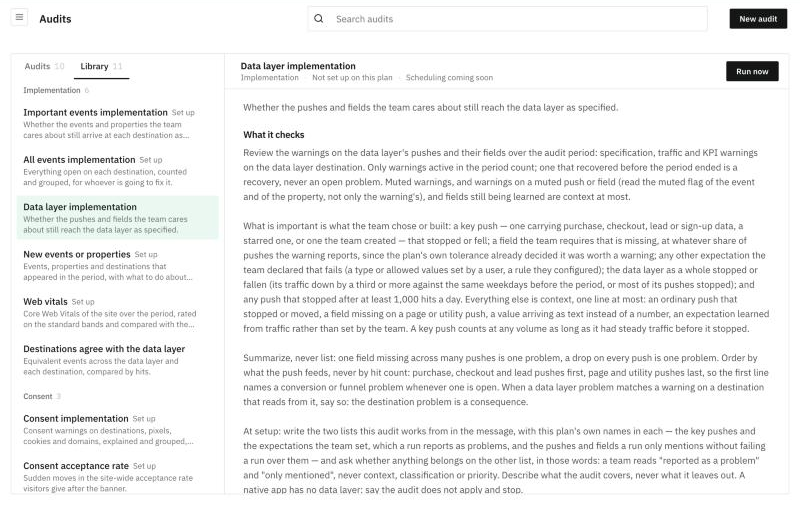
Two data layer audits are ready in the Library, under Implementation:
- Data layer implementation: whether the pushes and fields your team cares about still reach the data layer as specified. Key pushes come first, such as purchase, checkout, lead or sign-up.
- Destinations agree with the data layer: equivalent events across the data layer and each destination, compared by hits.
Click one to read what it checks, then Run now to set it up and run it.
Need something more specific? Create a custom audit: click New audit and describe what it should check, for example "Check that every checkout push carries currency, value and items, and tell me when one stops". Set its notifications to hear by email or Slack only when something needs attention. See Audits.