Compliance > Consent shows how visitors answer your consent banner and whether each destination, cookie, domain and pixel respects it.
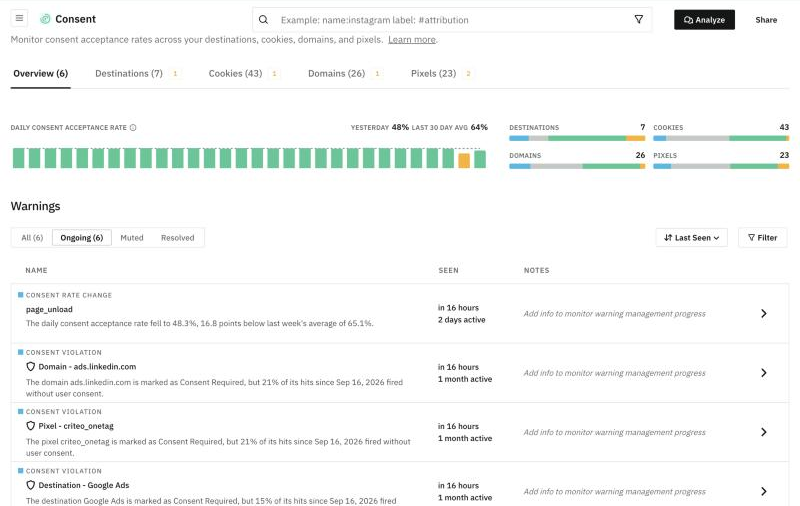
Overview
The Overview tab gives you the big picture:
- The Daily consent acceptance rate, for yesterday and as a 30-day average.
- How many destinations, cookies, domains and pixels Trackingplan sees.
- The consent Warnings, with the same tabs, sorting and filters as any warnings table.
Destinations, Cookies, Domains and Pixels
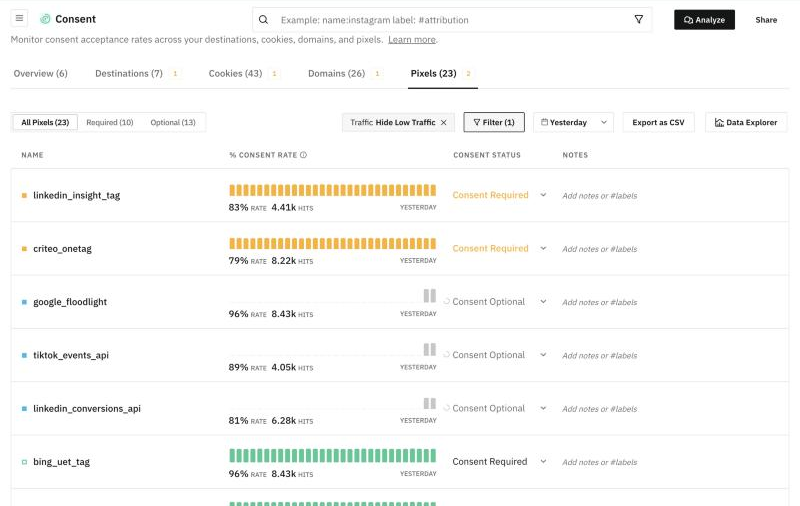
Each tab lists what Trackingplan found, with:
- Their % consent rate and hits.
- Their Consent status: Consent Required or Consent Optional. If one is wrong, change it right from the list.
- Notes and #labels.
You can filter by Required or Optional, hide low traffic and choose the day. To share or dig deeper, Export as CSV or open the data in Data Explorer.
Analyze
Analyze, at the top, opens a thread where you can ask the agent about your consent data. See Threads.
To learn what Trackingplan watches, when it warns you and how to set up consent, see Consent & Cookie Monitoring.