For the digital analytics team that owns the tracking, where every question ends up. Ask the agent in a thread: it checks the raw traffic, the data layer, the releases and the tag manager before it answers, and shows the queries behind each figure.
Check a release before it hurts the reports
After a release, ask whether it broke anything on the events that matter:
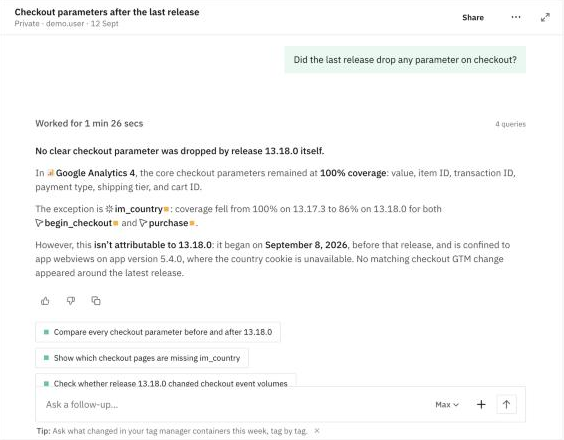
Did the last release drop any parameter on checkout?
The agent compares each parameter's coverage before and after the release, event by event. It tells you whether a change comes from that release or started earlier. Follow-ups take you to the hits before and after, or to the pages where a parameter is missing.
Review the data layer and the main events
Review the dataLayer and the main events — tell me if you see any implementation problem.
The answer opens with a verdict, then lists the problems by priority: what is happening, on which destinations, the evidence, and the fix. For example, an event that is still pushed to the data layer but no longer reaches GA4 because a trigger changed in the tag manager.
Follow what changed in Google Tag Manager
What changed in my GTM container lately?
The agent lists the published versions of each container, web and server-side, with the tags, triggers and variables changed in each one. When the data changes, you can see which version caused it.
Tell a real drop from a tracking problem
Why did purchases in Germany fall yesterday?
The agent compares the day with its baseline and the same weekday before, and splits it by device or source. Then it tells you whether the drop is real. If a warning affects the figures, a Data quality note says how far you can trust them.
Find why a property is missing
Why is "country" missing from our events? How do I fix it?
The answer explains the cause: which events, platforms and app versions, and where the value is lost before it reaches the destination. Then it gives the recommended fix and how to verify it. Need to hand it to the development team? Ask for the result as a report.
Keep checking it
Turn the checks you repeat into audits, so you don't have to ask twice: Important events implementation, New events or properties, Data layer implementation and Tag manager changes are ready in the Library. For everything the agent and audits can check on your data layer, see Data Layer Monitoring. For a warning that is already open, see Investigate a Warning.