Daily checks are automated checks that catch the tracking problems a person would miss, the kind that normally take hours of manual analysis. Each check runs once a day and shows you the real sessions that fail, so you can debug them. Open Platform > Daily checks.
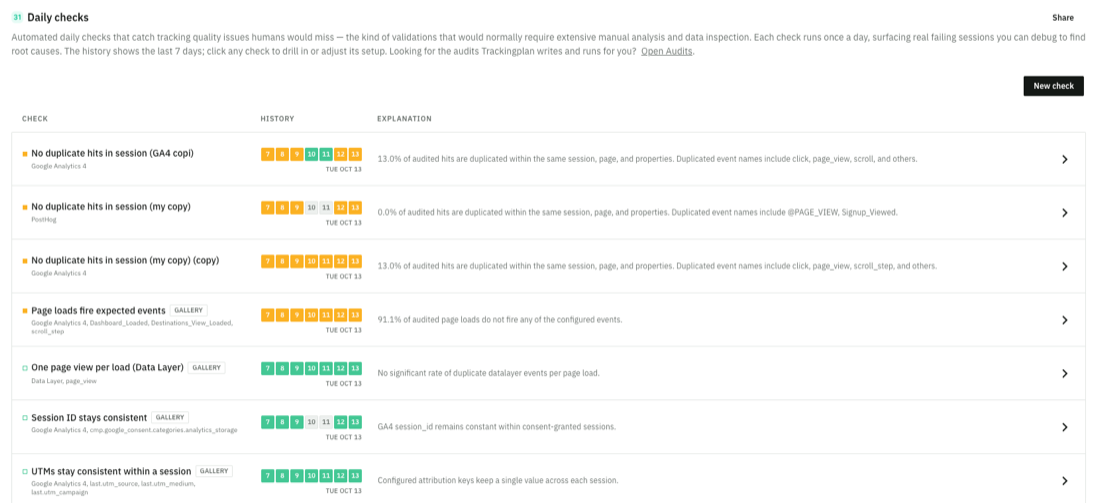
The list of checks
Each row shows:
- Check: its name, the destination and the fields it looks at. GALLERY marks a ready-made check.
- History: the last 7 days, one box per day. The color tells you whether the check passed, failed or had no data.
- Explanation: the result of the last run, in one line.
Click a check to see its failing sessions or adjust its setup. If there are not enough sessions to evaluate, the explanation tells you and links to the check's parameters.
Create a check
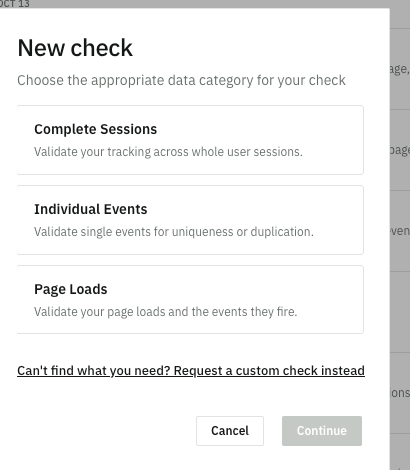
- Click New check.
- Choose the data category: Complete Sessions (your tracking across whole user sessions), Individual Events (single events, for uniqueness or duplication) or Page Loads (page loads and the events they fire).
- Choose the behavior to validate, for example Cart stays consistent through checkout, Property values stay consistent within a session, Session ID stays consistent or Sessions include a page view.
- Set its parameters. They depend on the behavior: for example the destination, the consent key that filters the hits, or the allowed failure rate.
- Give it a name, or leave the default one, and click Create check.
Can't find the check you need? Click Request a custom check.
Daily checks and audits
Daily checks are fixed validations that run on sessions every day. Audits are checks that Trackingplan writes and runs for you, each with a verdict. You can reach them from the Daily checks screen.