Trackingplan’s Connector for Data Studio (formerly known as Looker Studio) lets you check the data quality of all your plans right from Google's BI tool. It turns what you already get in Trackingplan’s daily digest into an interactive dashboard, so it is easier to spot problems, decide what to fix first and keep your team up to date.
This video walks you through the setup and the dashboard.
It is a native connector built by Trackingplan, so you can use the data however you like. The dashboard we provide is just one example of what you can build.
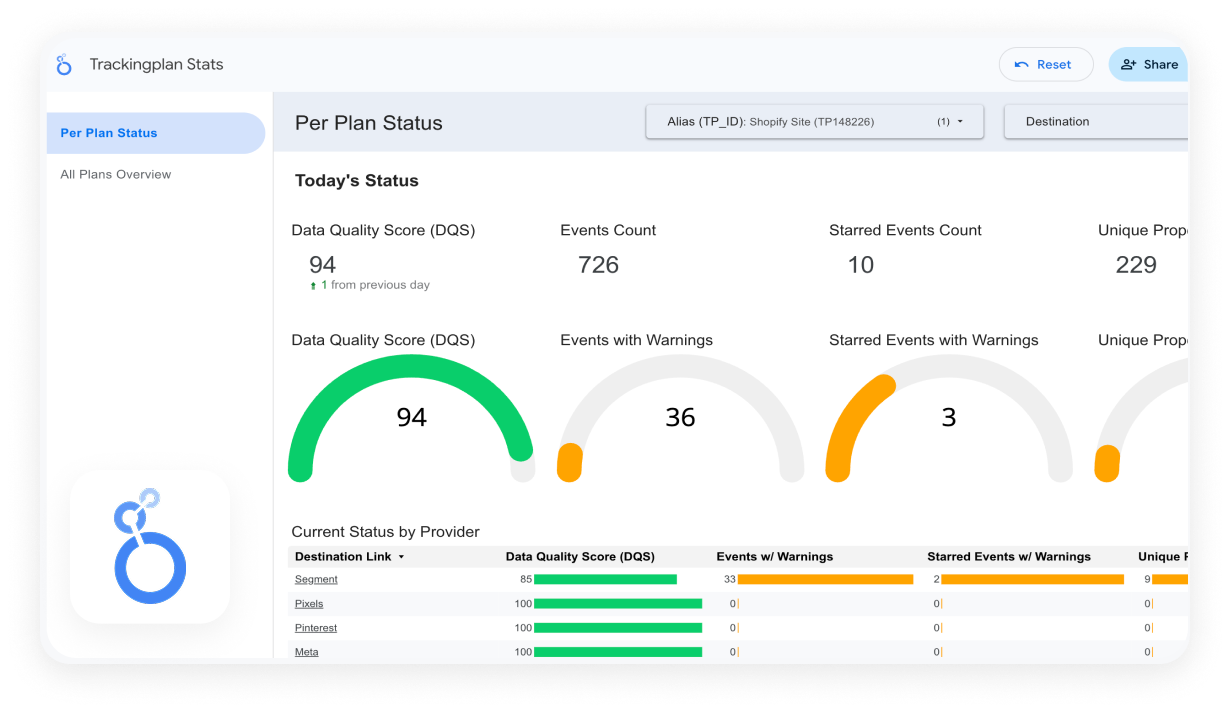
The example report has two main sections, and you can switch between plans to explore your events:
- Per-plan view: check each plan’s tracking health on its own.
- Global view: compare data quality across all your plans at a glance.
Metrics Included
Each plan’s section shows:
- Total number of events
- Events with warnings
- Starred events (the ones you’ve marked as important in Trackingplan’s Dashboard) with warnings
- Unique properties or parameters detected by Trackingplan
From these, the connector calculates a Data Quality Score from 0 to 100. Above 90 usually means everything is in good shape.
You can also:
- Break down metrics by provider (e.g., GA4, Segment, etc.)
- Track how the Data Quality Score evolves (last 30 days by default)
- Explore historical charts of warnings by event, by starred event and by property
Global Overview for Agencies and Multi-Brand Teams
If you manage several plans, such as different websites, apps or clients, the Global View brings all their data and scores together, plan by plan. You see which ones need attention first, without jumping between dashboards.
How to Use It
- Make a copy of the Trackingplan Data Studio report.
- When prompted, authorize the Trackingplan community connector.
- Log in to your Trackingplan account to connect your plans.
- Once connected, the report will display your own live data.
- Click “Allow” to enable Community Visualizations and unlock all charts.
That's it. You can now explore, customize and share your Trackingplan data in Data Studio.
Questions or feedback? Reach out to our support team.