Trackingplan gives you three ways to reach your data from outside the app: the Exploration API for monitoring data, the Export API for your tracking plan, and the MCP endpoint for Claude, Cursor, ChatGPT or your IDE. This page tells you which one to use. Each one has its own doc with the details.
Which one to use
| You want to | Use | How you connect |
|---|---|---|
| Put monitoring data in your BI tool or dashboards | Exploration API | Ask support to set it up |
| Pull your tracking plan into Sheets, Notion or your own tools | Export API | Your TP_ID and your sharing token |
| Ask about your plan and change it from an AI tool | MCP Endpoint | Sign in with your own account, no API key |
Exploration API
The Exploration API reads your monitoring data in real time, straight from the data exploration views.
Use it to put tracking quality next to the rest of your data:
- Build reports on top of your tracking quality data.
- Feed monitoring signals into internal dashboards.
- Send them to your own workflows.
To set it up, contact support. See Trackingplan Exploration API.
Export API
The Export API returns your tracking plan, so you can use it in other tools.
- You need your TP_ID and your sharing token.
- By default you get the production environment in JSON.
- Optional parameters export another environment, or CSV instead.
There is one endpoint per region. Plans hosted in the EU use https://eu-api.trackingplan.com. Plans hosted outside the EU use https://api.trackingplan.com.
The OpenAPI schema and the parameters are in Trackingplan Export API.
MCP Endpoint
The MCP endpoint connects your plan to Claude, Cursor, ChatGPT or your IDE. Everyone signs in as themselves and sees exactly what they see in the app.
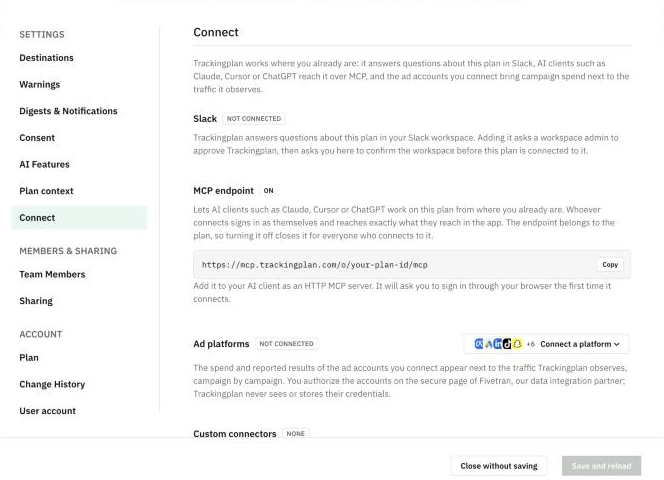
- Open Settings & Members, then Connect.
- In MCP endpoint, click Copy next to the plan's address.
- Add it to your tool as an HTTP MCP server.
- Sign in through your browser the first time.
From there you can ask about the plan, or about every plan in your organization. You can also change the plan, for example an event's spec. Nothing changes until you approve it.
The endpoint belongs to the plan. If you turn it off, it closes for everyone. See MCP Endpoint.
JSON schemas and the command line
To copy event specifications between plans or destinations, export them as a JSON Schema from the panel and import them elsewhere. The Trackingplan command-line tool applies the same changes outside the panel. See JSON Export/Import.